

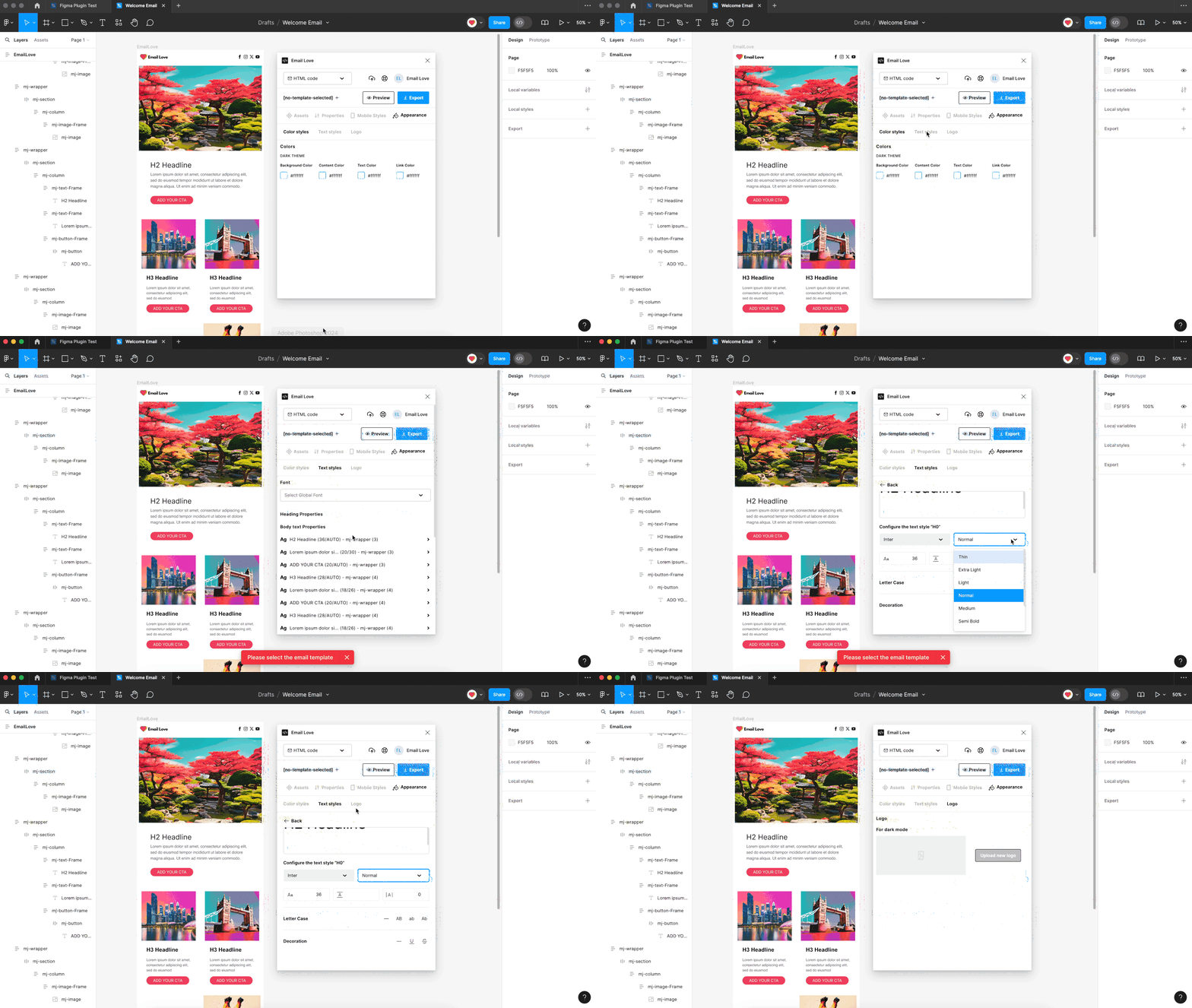
Layers that Support Appearance Styling
- Frame: Apply dark mode and font styling to all of the components inside of your frame.
- mj-wrapper: Apply dark mode and font styling to an individual wrapper component.
Using the Appearance Tab
1
Select the frame or wrapper
Select the entire email frame or a wrapper within the frame.
2
Open the Appearance tab
Click the Appearance Tab in the plugin interface.
3
Customize dark mode colors
To override the default dark mode settings on Apple devices (labeled “DARK THEME (iOS Only)” in the plugin), customize the following:
- Background Color: Set a specific background color that will appear in dark mode.
- Content Color: Define the color for the main content area.
- Text Colors: Choose colors for the text that will be displayed in dark mode.
- Link Colors: Customize the color of hyperlinks to ensure they are visible and match your design theme.
4
Set global fonts
To apply a consistent set of text styles across your entire email template, select a standard font, e.g. Arial, that will be applied to all text components in your email. This selection updates every text element in your design to the chosen font. In addition, select a fallback font that ensures your email displays correctly in different email clients.
5
Style text presets
Individually style text presets such as heading styles (H1 through H5), body text, links, buttons, and footer text. These are text style presets within the plugin that help you maintain consistent formatting. Note that the actual email HTML uses styled
<div> elements with inline CSS, not semantic heading tags like <h1> or <h2>. The heading labels (H1, H2, etc.) are organizational labels for your text hierarchy, not the HTML output. For example, to style your H1 heading:- Select the H1 element in the Appearance Tab.
- Customize the font, font size, letter case, and text decoration, e.g., underline and bold.
- These changes will automatically apply to all H1 components in your email design.
6
Update the dark mode logo
The Appearance Tab also allows you to update the logo that appears in dark mode. This ensures your brand logo is visible and looks great on dark backgrounds.
Benefits of Using the Appearance Tab
- Consistency: Apply uniform styles across your email design, ensuring a cohesive look and feel.
- Accessibility: Customize dark mode settings to enhance readability and accessibility on devices that support dark mode.
- Efficiency: Quickly update text styles and global fonts from a single location, saving time and effort.
- Customization: Fine-tune the appearance of various text elements to match your brand’s aesthetic.