

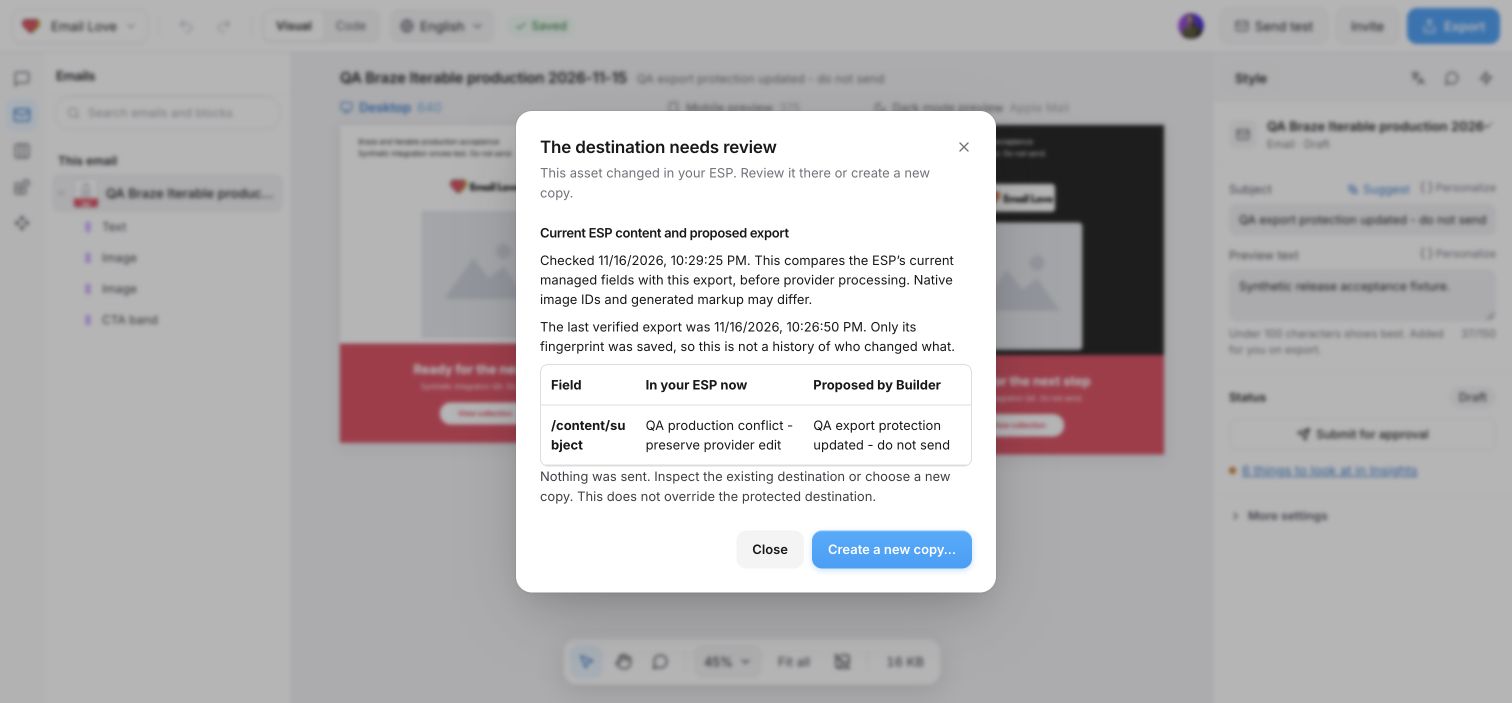
If someone changes a protected destination after Builder’s last verified export, Builder stops the next update. The destination needs review shows the current platform content beside the content Builder proposed to export.
Export conflict dialog comparing a subject in the platform with the subject proposed by Builder

A synthetic test email with a changed subject. Builder shows both values and leaves the destination unchanged.

Choose what to keep

  1. Read In your ESP now and Proposed by Builder for each field shown.
  2. Open the email in your platform if you need to inspect its complete content.
  3. Choose Close to leave that destination unchanged, or Create a new copy… to review a separate export from Builder.
A new copy does not replace the protected destination. There is no force-overwrite option, and changes in your platform do not sync back into Builder.

What the comparison shows

This compares the platform’s current managed fields with the export you just requested. It is not a history of changes and does not identify who edited them. Builder retains a fingerprint of the last verified content, not its full historical HTML. Long values show an excerpt around the first difference. Large comparisons show a limited number of fields. Code appears as text. Native image IDs and generated markup can differ because the proposed export is compared before image hosting and other platform processing. Comparisons support protected Customer.io, Klaviyo, Braze, Iterable, HubSpot and Marketo exports. Missing assets, older exports without a verified baseline, and unsupported structure changes may require a new copy without a field comparison. If Builder cannot load a comparison, the update stays blocked.

Conflicts during a batch

A conflict stops a bulk export. Earlier verified exports remain saved, and later rows are not sent. Review the stopped row before starting another batch. Check delivery status reads the existing attempt; it does not resend it.