

Create Marketo emails and templates, choose classic editing options, and update verified exports without losing track of changes in Marketo.
Export a Builder email to Adobe Marketo Engage as an email in a program or folder, or as an email template only. Email exports get their own backing template in Design Studio.The integration supports verified updates, classic editable regions, movable modules, native image controls, approved snippets and mapped dynamic content. Classic movable modules are available to all connected accounts.
Connect Marketo
You need a workspace owner or admin in Builder and an administrator who can set up Marketo API access.
In Marketo, open Admin > Users & Roles. Create an API role with Read-Write Assets and Approve Assets, with access to the Default workspace and each workspace you will use.
Assign that role to an API-only user.
In Admin > LaunchPoint, create a Custom service for that user. View Details shows its Client ID and Client Secret.
In Admin > Web Services, copy the REST API endpoint. Builder also accepts the Munchkin ID.
In Builder, open Integrations > Marketo, enter those values, and click Connect.
Choose a Template folder under Design Studio folder for email templates, then save. Choose a folder that can hold email templates, rather than the Design Studio root.
The template folder is required even when the finished email goes into a program. Marketo needs a template to create the email. Approving that backing template does not approve the email itself.For the credential locations, see Adobe’s authentication guide.
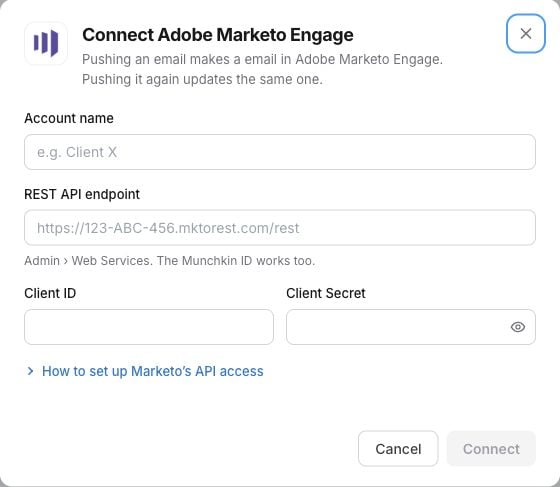
Connect Adobe Marketo Engage in Integrations before exporting. This example shows blank connection fields; use the credentials for your account.
Choose how people will edit it
Choice
What you get in Marketo
Next export from Builder
Editable in Marketo’s classic editor off
The compiled HTML design
Update the verified destination or create a new copy
Classic editable regions
Editable content sections in the classic editor
Update while the saved content and region structure still match, or create a new copy
Classic movable modules (new copy)
Sections people can move and duplicate in the classic editor
Create a new copy
These formats target Marketo’s classic editor, not the New Email Designer. Export permissions and any account-specific export pause still apply.
Movable modules do not support updating an existing export. After someone reorders, duplicates or edits modules in Marketo, create a new copy from Builder to keep that work intact. Layouts that cannot be separated into supported modules stop the export.
Edit buttons and images in Marketo
With Classic movable modules (new copy) selected, supported buttons get native label and destination fields. Supported images get an image picker and alt-text field; images that already have a link also get a destination field. Unlinked images stay unlinked.Each module has its own values. You can duplicate a module and change its image, button or link independently. Image dimensions and responsive layout are retained, so choose replacement images with the original aspect ratio and check the mobile preview. Button labels and links are applied to both the regular HTML and Outlook button.
Open a module in Marketo's classic editor to find its button and image fields under Local Variables. Use the image-picker icon beside the image field to choose a replacement.
Personalized images, background images, responsive picture sources and images that share a link with text keep their original content. Unsupported buttons also retain their original content. Builder reports notices for content it cannot turn into native controls. Review the text alternative after editing in Marketo.
Replace a section with a snippet
Select Classic movable modules (new copy).
Under Marketo snippets, click Browse approved snippets.
Choose an approved snippet for each section you want to replace. Leave Keep this section’s content selected for the others.
Export and preview the result in Marketo.
Choose an approved snippet for the section it should replace. Other sections can keep their existing content.
This creates a native snippet reference. The snippet’s content is managed in Marketo, and it replaces the whole selected section. Use approved, static classic snippets in the same Marketo workspace as the destination. Create or approve the snippet in Marketo before browsing. Segmented snippets are not supported by this flow.
Map content versions to a segmentation
For an email export, Builder can map saved content versions to an existing approved Marketo segmentation. Marketo’s segment rules decide who sees each version; Builder does not copy its condition rules into Marketo.
In Builder, arrange one adjacent section per version of a saved condition, including Everyone else. The versions must have compatible layouts.
In the export dialog, choose Classic movable modules (new copy) and click Browse approved segmentations under Dynamic content.
Select a segmentation, then choose a content version for every segment. Marketo Default is fixed to Everyone else.
Keep Copy images into Marketo off for this export. Dynamic content uses the current image URLs.
Sync a new copy, then preview every segment and its text alternative in Marketo before sending.
Map every segment to a saved content version. Default always uses Everyone else.
Leaving a group at Export Everyone else only exports only that fallback. An incomplete mapping blocks export. If the approved segments change, reopen the dialog and map them again.Native dynamic content is available for new email copies, not template-only exports or updates to existing copies. It supports up to 100 segments, including Default, in the destination’s Marketo workspace. Dynamic sections do not expose native image or button variables; static modules elsewhere in the email keep those controls. A dynamic section cannot also be replaced with a snippet. Builder does not create or change segmentations, audience rules or recipient records.
Export an email or template
Open the email in Builder and click Export.
Under Export to your ESP, select your Marketo account.
Choose Email in a program or Email template only.
For an email, find its program or browse to a folder. For a template, choose a Design Studio template folder.
Check the Name in Marketo, sender details and editing options.
Click Sync to Marketo or Create the template.
Check the Marketo account, destination and name before syncing a new copy.
Program search covers recent programs. If the program is missing from search, use Browse Marketing Activities instead and navigate the folder tree.For email exports, the dialog also includes:
From name, From address and Reply-to. Empty values use the connection or Marketo defaults.
Description for identifying the asset.
Operational email. Use this only for transactional or legal messages: operational emails can bypass unsubscribe and marketing-suspension settings. Changing this choice on an existing exported email requires a new copy.
Turn off open tracking.
Approve it in Marketo. When this is off, the email remains a draft. Check it each time if your connection has automatic approval enabled.
Send a sample to. Enter an address only when you want Marketo to send a sample. Leaving it empty sends no sample.
Exporting does not schedule a campaign or send to an audience. If a required content step fails, Builder stops later approval and sample-send steps. Review the reported status before trying again.
Host images in Marketo
In the connection’s Optional settings, turn on Copy images into Marketo and choose an Images and Files folder. Builder copies supported images into Design Studio and uses their hosted URLs. Images that cannot be copied keep their existing URLs, with a warning in the sync result.Leave this off to keep the image URLs already used by the email.
Update an earlier export
Reopen Export > Marketo and choose Update the email, Update the template, or Create a new one. Confirm an update with Update in Marketo.Before updating, Builder checks the destination against the last verified export. It reads the saved result back before recording success. Verified exports now retain their editable, operational and open-tracking choices, so the next update dialog can restore them.Builder stops an update when it finds changed remote content, incompatible editable regions, or a template that could affect other emails. An older export without a verified baseline also needs a new copy. There is no force-overwrite option in this flow.If you have edited the email in Marketo, keep editing that version there or create a new copy from Builder. Marketo edits do not sync back into Builder.
Personalization
Authored Marketo merge tags are preserved. Configure the required tokens in Marketo and preview them in the program that will send the email.Builder does not create program-level My Tokens, generate Velocity script tokens from conditions, or author native Marketo global variables. A token remaining intact in the exported code does not confirm that it resolves for a recipient.
Troubleshooting
What you see
What to do
No template folder selected
Open the Marketo connection and choose a Design Studio email-template folder.
A program is missing from search
Browse the folder tree instead. Check the API user’s workspace access.
The destination changed or its structure is incompatible
Review it in Marketo. Keep that version or create a new copy from Builder.
The template is shared with other emails
Create a new copy so an update does not change those emails.
Classic movable modules require a new copy
Select Create a new one. Existing modular exports cannot be updated in place.
A character or emoji is unsupported
Remove the character identified by the error, then try again.
The outcome is uncertain or partially saved
Check the recorded delivery status and the assets in Marketo. Do not start another export until the first attempt is resolved. Contact Email Love if it remains unresolved.
Review desktop and mobile rendering, the text alternative, links and personalization in Marketo before sending. Builder does not clone programs, schedule campaigns, publish to Sales Insight, sync landing pages or import Marketo performance reports.See verified updates and delivery status for the shared export behavior.
{"docsConfig":{"theme":"mint","$schema":"https://mintlify.com/docs.json","name":"Email Love","colors":{"primary":"#E81A3F","light":"#EE3F5E","dark":"#EB3656"},"logo":{"light":"https://mintcdn.com/emaillove/zdvKWcm2hTqSKqVZ/logo/light.png?fit=max\u0026auto=format\u0026n=zdvKWcm2hTqSKqVZ\u0026q=85\u0026s=1d0cc0df4e2036624a1a61cb4e0a6938","dark":"https://mintcdn.com/emaillove/zdvKWcm2hTqSKqVZ/logo/dark.png?fit=max\u0026auto=format\u0026n=zdvKWcm2hTqSKqVZ\u0026q=85\u0026s=1ea50a0749925dca8777790b59abb046"},"favicon":"https://mintcdn.com/emaillove/zdvKWcm2hTqSKqVZ/favicon.png?fit=max\u0026auto=format\u0026n=zdvKWcm2hTqSKqVZ\u0026q=85\u0026s=0c16739dc1b58fa00ba58481eae48d5b","seo":{"metatags":{"canonical":"https://help.emaillove.com"}},"fonts":{"family":"Inter"},"integrations":{"plausible":{"domain":"help.emaillove.com"}},"interaction":{"drilldown":false},"styling":{"latex":true},"navigation":{"global":{"anchors":[{"anchor":"Community","icon":"slack","href":"https://emaillove.com/go/slack"}]},"pages":[]}},"deployment":{"deploymentMetadataValue":{"subdomain":"emaillove","hasAudioNarration":false,"actualSubdomain":"emaillove","customDomains":["help.emaillove.com"],"gitSource":{"type":"github","owner":"email-love","repo":"docs","deployBranch":"main","contentDirectory":"","isPrivate":true,"mountPath":"","label":""},"entitlements":{},"buildId":"6af8c8378ab3673930439aab","clientVersion":"0.0.4143","searchFilterCounts":[{"language":"default","tag":"Documentation","count":196},{"language":"default","tag":"Figma Plugin","count":115},{"language":"default","tag":"Builder","count":81},{"language":"default","tag":"Integrations","count":46},{"language":"default","tag":"ESP Integrations","count":32},{"language":"default","tag":"Email platforms","count":27},{"language":"default","tag":"Building with Components","count":13},{"language":"default","tag":"Styling","count":13},{"language":"default","tag":"Editor","count":8},{"language":"default","tag":"Asset libraries","count":8}]},"assistantConfig":{},"basePath":"","hasChatPermissions":false,"hasWebMcpPermissions":false,"toggles":[{"name":"kill-isr","enabled":true,"variant":{"name":"disabled","enabled":false,"feature_enabled":true},"impressionData":false},{"name":"custom-rbac-roles","enabled":true,"variant":{"name":"disabled","enabled":false,"feature_enabled":true},"impressionData":false},{"name":"agent-mintlify-slack","enabled":true,"variant":{"name":"disabled","enabled":false,"feature_enabled":true},"impressionData":false},{"name":"agent-integrations-settings","enabled":true,"variant":{"name":"disabled","enabled":false,"feature_enabled":true},"impressionData":false},{"name":"rbac-expansion","enabled":true,"variant":{"name":"disabled","enabled":false,"feature_enabled":true},"impressionData":false},{"name":"automations-pr-grouping","enabled":true,"variant":{"name":"disabled","enabled":false,"feature_enabled":true},"impressionData":false},{"name":"custom-prefix","enabled":true,"variant":{"name":"disabled","enabled":false,"feature_enabled":true},"impressionData":false},{"name":"analytics-v7","enabled":true,"variant":{"name":"disabled","enabled":false,"feature_enabled":true},"impressionData":false},{"name":"user-flows-analytics","enabled":true,"variant":{"name":"disabled","enabled":false,"feature_enabled":true},"impressionData":false},{"name":"no-publish-flow","enabled":true,"variant":{"name":"disabled","enabled":false,"feature_enabled":true},"impressionData":false},{"name":"workos-onboarding","enabled":true,"variant":{"name":"disabled","enabled":false,"feature_enabled":true},"impressionData":false},{"name":"snapshot-serving-live","enabled":true,"variant":{"name":"disabled","enabled":false,"feature_enabled":true},"impressionData":false},{"name":"stripTemperatureMiddleware","enabled":true,"variant":{"name":"disabled","enabled":false,"feature_enabled":true},"impressionData":false},{"name":"support-platform-pylon-zendesk","enabled":true,"variant":{"name":"disabled","enabled":false,"feature_enabled":true},"impressionData":false},{"name":"snapshot-serving","enabled":true,"variant":{"name":"disabled","enabled":false,"feature_enabled":true},"impressionData":false},{"name":"instant-rollback","enabled":true,"variant":{"name":"disabled","enabled":false,"feature_enabled":true},"impressionData":false},{"name":"granular-notifications-server","enabled":true,"variant":{"name":"disabled","enabled":false,"feature_enabled":true},"impressionData":false},{"name":"granular-notifications","enabled":true,"variant":{"name":"disabled","enabled":false,"feature_enabled":true},"impressionData":false},{"name":"automations-fable","enabled":true,"variant":{"name":"disabled","enabled":false,"feature_enabled":true},"impressionData":false},{"name":"fixed-ai-action-pricing","enabled":true,"variant":{"name":"disabled","enabled":false,"feature_enabled":true},"impressionData":false},{"name":"automation-resolve-merge-conflict","enabled":true,"variant":{"name":"disabled","enabled":false,"feature_enabled":true},"impressionData":false},{"name":"scoped-publishing","enabled":true,"variant":{"name":"disabled","enabled":false,"feature_enabled":true},"impressionData":false},{"name":"mintql","enabled":true,"variant":{"name":"disabled","enabled":false,"feature_enabled":true},"impressionData":false},{"name":"page-level-analytics","enabled":true,"variant":{"name":"disabled","enabled":false,"feature_enabled":true},"impressionData":false},{"name":"editor-version-history-v2","enabled":true,"variant":{"name":"disabled","enabled":false,"feature_enabled":true},"impressionData":false},{"name":"billing-page-v2","enabled":true,"variant":{"name":"disabled","enabled":false,"feature_enabled":true},"impressionData":false},{"name":"full-page-search","enabled":true,"variant":{"name":"disabled","enabled":false,"feature_enabled":true},"impressionData":false},{"name":"workspace-projects","enabled":true,"variant":{"name":"disabled","enabled":false,"feature_enabled":true},"impressionData":false},{"name":"assistant-v5","enabled":true,"variant":{"name":"disabled","enabled":false,"feature_enabled":true},"impressionData":false},{"name":"fork-pr-previews","enabled":true,"variant":{"name":"disabled","enabled":false,"feature_enabled":true},"impressionData":false},{"name":"revalidation-jwt","enabled":true,"variant":{"name":"disabled","enabled":false,"feature_enabled":true},"impressionData":false},{"name":"workos-sso-scim","enabled":true,"variant":{"name":"disabled","enabled":false,"feature_enabled":true},"impressionData":false},{"name":"hobby-abuse-scan","enabled":true,"variant":{"name":"disabled","enabled":false,"feature_enabled":true},"impressionData":false},{"name":"dashboard-inbox","enabled":true,"variant":{"name":"disabled","enabled":false,"feature_enabled":true},"impressionData":false},{"name":"workos-signup","enabled":true,"variant":{"name":"disabled","enabled":false,"feature_enabled":true},"impressionData":false},{"name":"turbopuffer-dual-write","enabled":true,"variant":{"name":"disabled","enabled":false,"feature_enabled":true},"impressionData":false},{"name":"workos-enabled","enabled":true,"variant":{"name":"disabled","enabled":false,"feature_enabled":true},"impressionData":false},{"name":"approve-review-flow","enabled":true,"variant":{"name":"disabled","enabled":false,"feature_enabled":true},"impressionData":false},{"name":"editor-metadata","enabled":true,"variant":{"name":"disabled","enabled":false,"feature_enabled":true},"impressionData":false},{"name":"sso-setup-deadline-banner","enabled":true,"variant":{"name":"disabled","enabled":false,"feature_enabled":true},"impressionData":false},{"name":"turbopuffer-serve","enabled":true,"variant":{"name":"disabled","enabled":false,"feature_enabled":true},"impressionData":false},{"name":"live-agents","enabled":true,"variant":{"name":"disabled","enabled":false,"feature_enabled":true},"impressionData":false},{"name":"llms-txt-v2","enabled":true,"variant":{"name":"disabled","enabled":false,"feature_enabled":true},"impressionData":false}],"googleFontsInlined":false},"customCss":[],"page":{"pagePath":"builder/sending/marketo","slug":"/builder/sending/marketo","pageMetadata":{"title":"Marketo","description":"Create Marketo emails and templates, choose classic editing options, and update verified exports without losing track of changes in Marketo.","href":"/builder/sending/marketo"},"description":{"compiledSource":"\"use strict\";\nconst {jsx: _jsx} = arguments[0];\nconst {useMDXComponents: _provideComponents} = arguments[0];\nfunction _createMdxContent(props) {\n const _components = {\n p: \"p\",\n ..._provideComponents(),\n ...props.components\n };\n return _jsx(_components.p, {\n children: \"Create Marketo emails and templates, choose classic editing options, and update verified exports without losing track of changes in Marketo.\"\n });\n}\nfunction MDXContent(props = {}) {\n const {wrapper: MDXLayout} = {\n ..._provideComponents(),\n ...props.components\n };\n return MDXLayout ? _jsx(MDXLayout, {\n ...props,\n children: _jsx(_createMdxContent, {\n ...props\n })\n }) : _createMdxContent(props);\n}\nreturn {\n default: MDXContent\n};\n","frontmatter":{},"scope":{}},"pageType":"default","mdx":{"mdxSource":{"compiledSource":"\"use strict\";const{Fragment:_Fragment,jsx:_jsx,jsxs:_jsxs}=arguments[0];const{useMDXComponents:_provideComponents}=arguments[0];function _createMdxContent(props){const _components={a:`a`,li:`li`,ol:`ol`,p:`p`,strong:`strong`,tbody:`tbody`,td:`td`,th:`th`,thead:`thead`,tr:`tr`,ul:`ul`,..._provideComponents(),...props.components},{Frame,Heading,Note,OptimizedImage,Table}=_components;if(!Frame)_missingMdxReference(`Frame`,true);if(!Heading)_missingMdxReference(`Heading`,true);if(!Note)_missingMdxReference(`Note`,true);if(!OptimizedImage)_missingMdxReference(`OptimizedImage`,true);if(!Table)_missingMdxReference(`Table`,true);return _jsxs(_Fragment,{children:[_jsxs(_components.p,{children:[`Export a Builder email to Adobe Marketo Engage as an `,_jsx(_components.strong,{children:`email in a program or folder`}),`, or as an `,_jsx(_components.strong,{children:`email template only`}),`. Email exports get their own backing template in Design Studio.`]}),`\n`,_jsx(_components.p,{children:`The integration supports verified updates, classic editable regions, movable modules, native image controls, approved snippets and mapped dynamic content. Classic movable modules are available to all connected accounts.`}),`\n`,_jsx(Heading,{level:`2`,id:`connect-marketo`,children:`Connect Marketo`}),`\n`,_jsx(_components.p,{children:`You need a workspace owner or admin in Builder and an administrator who can set up Marketo API access.`}),`\n`,_jsxs(_components.ol,{children:[`\n`,_jsxs(_components.li,{children:[`In Marketo, open `,_jsx(_components.strong,{children:`Admin > Users \u0026 Roles`}),`. Create an API role with `,_jsx(_components.strong,{children:`Read-Write Assets`}),` and `,_jsx(_components.strong,{children:`Approve Assets`}),`, with access to the Default workspace and each workspace you will use.`]}),`\n`,_jsxs(_components.li,{children:[`Assign that role to an `,_jsx(_components.strong,{children:`API-only user`}),`.`]}),`\n`,_jsxs(_components.li,{children:[`In `,_jsx(_components.strong,{children:`Admin > LaunchPoint`}),`, create a `,_jsx(_components.strong,{children:`Custom`}),` service for that user. `,_jsx(_components.strong,{children:`View Details`}),` shows its `,_jsx(_components.strong,{children:`Client ID`}),` and `,_jsx(_components.strong,{children:`Client Secret`}),`.`]}),`\n`,_jsxs(_components.li,{children:[`In `,_jsx(_components.strong,{children:`Admin > Web Services`}),`, copy the `,_jsx(_components.strong,{children:`REST API endpoint`}),`. Builder also accepts the Munchkin ID.`]}),`\n`,_jsxs(_components.li,{children:[`In Builder, open `,_jsx(_components.strong,{children:`Integrations > Marketo`}),`, enter those values, and click `,_jsx(_components.strong,{children:`Connect`}),`.`]}),`\n`,_jsxs(_components.li,{children:[`Choose a `,_jsx(_components.strong,{children:`Template folder`}),` under `,_jsx(_components.strong,{children:`Design Studio folder for email templates`}),`, then save. Choose a folder that can hold email templates, rather than the Design Studio root.`]}),`\n`]}),`\n`,_jsx(_components.p,{children:`The template folder is required even when the finished email goes into a program. Marketo needs a template to create the email. Approving that backing template does not approve the email itself.`}),`\n`,_jsxs(_components.p,{children:[`For the credential locations, see `,_jsx(_components.a,{href:`https://experienceleague.adobe.com/en/docs/marketo-developer/marketo/rest/authentication`,children:`Adobe’s authentication guide`}),`.`]}),`\n`,_jsx(Frame,{caption:`Connect Adobe Marketo Engage in Integrations before exporting. This example shows blank connection fields; use the credentials for your account.`,children:_jsx(OptimizedImage,{src:`https://mintcdn.com/emaillove/qYrzRKTscc4O0qPw/images/builder/guides/connect-marketo.jpg?fit=max\u0026auto=format\u0026n=qYrzRKTscc4O0qPw\u0026q=85\u0026s=133dc3f95110894fe20bc9006b839f37`,alt:`Adobe Marketo Engage connection form in Builder`,width:`560`,\"data-og-width\":`560`,\"data-og-height\":`487`,\"data-path\":`images/builder/guides/connect-marketo.jpg`,\"data-optimize\":`true`,\"data-opv\":`3`,srcset:`https://mintcdn.com/emaillove/qYrzRKTscc4O0qPw/images/builder/guides/connect-marketo.jpg?w=280\u0026fit=max\u0026auto=format\u0026n=qYrzRKTscc4O0qPw\u0026q=85\u0026s=a8e92d3948efd48aae63092ffc7883b1 280w, https://mintcdn.com/emaillove/qYrzRKTscc4O0qPw/images/builder/guides/connect-marketo.jpg?w=560\u0026fit=max\u0026auto=format\u0026n=qYrzRKTscc4O0qPw\u0026q=85\u0026s=47c66fe549d6834972b9d4f2d8e14dbd 560w, https://mintcdn.com/emaillove/qYrzRKTscc4O0qPw/images/builder/guides/connect-marketo.jpg?w=840\u0026fit=max\u0026auto=format\u0026n=qYrzRKTscc4O0qPw\u0026q=85\u0026s=c39d82e8b6b649d6ef215b6673c7b274 840w, https://mintcdn.com/emaillove/qYrzRKTscc4O0qPw/images/builder/guides/connect-marketo.jpg?w=1100\u0026fit=max\u0026auto=format\u0026n=qYrzRKTscc4O0qPw\u0026q=85\u0026s=4fabe9f23b0a2d835832f79fc184740d 1100w, https://mintcdn.com/emaillove/qYrzRKTscc4O0qPw/images/builder/guides/connect-marketo.jpg?w=1650\u0026fit=max\u0026auto=format\u0026n=qYrzRKTscc4O0qPw\u0026q=85\u0026s=1143241e34922daaabc6c747db5ae79b 1650w, https://mintcdn.com/emaillove/qYrzRKTscc4O0qPw/images/builder/guides/connect-marketo.jpg?w=2500\u0026fit=max\u0026auto=format\u0026n=qYrzRKTscc4O0qPw\u0026q=85\u0026s=334818c4c8002256f5c684b463109c96 2500w`})}),`\n`,_jsx(Heading,{level:`2`,id:`choose-how-people-will-edit-it`,children:`Choose how people will edit it`}),`\n`,_jsxs(Table,{children:[_jsx(_components.thead,{children:_jsxs(_components.tr,{children:[_jsx(_components.th,{children:`Choice`}),_jsx(_components.th,{children:`What you get in Marketo`}),_jsx(_components.th,{children:`Next export from Builder`})]})}),_jsxs(_components.tbody,{children:[_jsxs(_components.tr,{children:[_jsxs(_components.td,{children:[_jsx(_components.strong,{children:`Editable in Marketo’s classic editor`}),` off`]}),_jsx(_components.td,{children:`The compiled HTML design`}),_jsx(_components.td,{children:`Update the verified destination or create a new copy`})]}),_jsxs(_components.tr,{children:[_jsx(_components.td,{children:_jsx(_components.strong,{children:`Classic editable regions`})}),_jsx(_components.td,{children:`Editable content sections in the classic editor`}),_jsx(_components.td,{children:`Update while the saved content and region structure still match, or create a new copy`})]}),_jsxs(_components.tr,{children:[_jsx(_components.td,{children:_jsx(_components.strong,{children:`Classic movable modules (new copy)`})}),_jsx(_components.td,{children:`Sections people can move and duplicate in the classic editor`}),_jsx(_components.td,{children:`Create a new copy`})]})]})]}),`\n`,_jsx(Note,{children:_jsx(_components.p,{children:`These formats target Marketo’s classic editor, not the New Email Designer. Export permissions and any account-specific export pause still apply.`})}),`\n`,_jsx(_components.p,{children:`Movable modules do not support updating an existing export. After someone reorders, duplicates or edits modules in Marketo, create a new copy from Builder to keep that work intact. Layouts that cannot be separated into supported modules stop the export.`}),`\n`,_jsx(Heading,{level:`3`,id:`edit-buttons-and-images-in-marketo`,children:`Edit buttons and images in Marketo`}),`\n`,_jsxs(_components.p,{children:[`With `,_jsx(_components.strong,{children:`Classic movable modules (new copy)`}),` selected, supported buttons get native label and destination fields. Supported images get an image picker and alt-text field; images that already have a link also get a destination field. Unlinked images stay unlinked.`]}),`\n`,_jsx(_components.p,{children:`Each module has its own values. You can duplicate a module and change its image, button or link independently. Image dimensions and responsive layout are retained, so choose replacement images with the original aspect ratio and check the mobile preview. Button labels and links are applied to both the regular HTML and Outlook button.`}),`\n`,_jsx(Frame,{caption:`Open a module in Marketo's classic editor to find its button and image fields under Local Variables. Use the image-picker icon beside the image field to choose a replacement.`,children:_jsx(OptimizedImage,{src:`https://mintcdn.com/emaillove/ClQjHwBgP98FJIyP/images/builder/guides/marketo-native-image-controls.jpg?fit=max\u0026auto=format\u0026n=ClQjHwBgP98FJIyP\u0026q=85\u0026s=dd5c6d1664316181f31bd313e2a9f2fc`,alt:`Marketo classic editor Local Variables panel with module-specific button text, button URL, image picker, alt text and image URL`,width:`300`,\"data-og-width\":`300`,\"data-og-height\":`474`,\"data-path\":`images/builder/guides/marketo-native-image-controls.jpg`,\"data-optimize\":`true`,\"data-opv\":`3`,srcset:`https://mintcdn.com/emaillove/ClQjHwBgP98FJIyP/images/builder/guides/marketo-native-image-controls.jpg?w=280\u0026fit=max\u0026auto=format\u0026n=ClQjHwBgP98FJIyP\u0026q=85\u0026s=49c211848cd8ed86e9033189272b940b 280w, https://mintcdn.com/emaillove/ClQjHwBgP98FJIyP/images/builder/guides/marketo-native-image-controls.jpg?w=560\u0026fit=max\u0026auto=format\u0026n=ClQjHwBgP98FJIyP\u0026q=85\u0026s=2795c1478d48dd4c7e2392a1e7458a42 560w, https://mintcdn.com/emaillove/ClQjHwBgP98FJIyP/images/builder/guides/marketo-native-image-controls.jpg?w=840\u0026fit=max\u0026auto=format\u0026n=ClQjHwBgP98FJIyP\u0026q=85\u0026s=4d4bab2cab414c7e5b9cfa94dca70a97 840w, https://mintcdn.com/emaillove/ClQjHwBgP98FJIyP/images/builder/guides/marketo-native-image-controls.jpg?w=1100\u0026fit=max\u0026auto=format\u0026n=ClQjHwBgP98FJIyP\u0026q=85\u0026s=34768a8195181b6eed69ae856e42cdef 1100w, https://mintcdn.com/emaillove/ClQjHwBgP98FJIyP/images/builder/guides/marketo-native-image-controls.jpg?w=1650\u0026fit=max\u0026auto=format\u0026n=ClQjHwBgP98FJIyP\u0026q=85\u0026s=3f15c704259282e4648fecf930011104 1650w, https://mintcdn.com/emaillove/ClQjHwBgP98FJIyP/images/builder/guides/marketo-native-image-controls.jpg?w=2500\u0026fit=max\u0026auto=format\u0026n=ClQjHwBgP98FJIyP\u0026q=85\u0026s=d4b36dace6c3f2f19a5349a3b0975119 2500w`})}),`\n`,_jsx(_components.p,{children:`Personalized images, background images, responsive picture sources and images that share a link with text keep their original content. Unsupported buttons also retain their original content. Builder reports notices for content it cannot turn into native controls. Review the text alternative after editing in Marketo.`}),`\n`,_jsx(Heading,{level:`3`,id:`replace-a-section-with-a-snippet`,children:`Replace a section with a snippet`}),`\n`,_jsxs(_components.ol,{children:[`\n`,_jsxs(_components.li,{children:[`Select `,_jsx(_components.strong,{children:`Classic movable modules (new copy)`}),`.`]}),`\n`,_jsxs(_components.li,{children:[`Under `,_jsx(_components.strong,{children:`Marketo snippets`}),`, click `,_jsx(_components.strong,{children:`Browse approved snippets`}),`.`]}),`\n`,_jsxs(_components.li,{children:[`Choose an approved snippet for each section you want to replace. Leave `,_jsx(_components.strong,{children:`Keep this section’s content`}),` selected for the others.`]}),`\n`,_jsx(_components.li,{children:`Export and preview the result in Marketo.`}),`\n`]}),`\n`,_jsx(Frame,{caption:`Choose an approved snippet for the section it should replace. Other sections can keep their existing content.`,children:_jsx(OptimizedImage,{src:`https://mintcdn.com/emaillove/ClQjHwBgP98FJIyP/images/builder/guides/marketo-snippet-selection.jpg?fit=max\u0026auto=format\u0026n=ClQjHwBgP98FJIyP\u0026q=85\u0026s=f277323ffd16be2929338dec0962b487`,alt:`Builder Marketo snippet settings with one section retained and another assigned to an approved static snippet`,width:`650`,\"data-og-width\":`650`,\"data-og-height\":`400`,\"data-path\":`images/builder/guides/marketo-snippet-selection.jpg`,\"data-optimize\":`true`,\"data-opv\":`3`,srcset:`https://mintcdn.com/emaillove/ClQjHwBgP98FJIyP/images/builder/guides/marketo-snippet-selection.jpg?w=280\u0026fit=max\u0026auto=format\u0026n=ClQjHwBgP98FJIyP\u0026q=85\u0026s=f762f81b1bf732d0b22eacfdd4e4e274 280w, https://mintcdn.com/emaillove/ClQjHwBgP98FJIyP/images/builder/guides/marketo-snippet-selection.jpg?w=560\u0026fit=max\u0026auto=format\u0026n=ClQjHwBgP98FJIyP\u0026q=85\u0026s=759e896a7cf187ba799fe49ff297c191 560w, https://mintcdn.com/emaillove/ClQjHwBgP98FJIyP/images/builder/guides/marketo-snippet-selection.jpg?w=840\u0026fit=max\u0026auto=format\u0026n=ClQjHwBgP98FJIyP\u0026q=85\u0026s=0a4d6a1881e80cc1cc51c7612f961f18 840w, https://mintcdn.com/emaillove/ClQjHwBgP98FJIyP/images/builder/guides/marketo-snippet-selection.jpg?w=1100\u0026fit=max\u0026auto=format\u0026n=ClQjHwBgP98FJIyP\u0026q=85\u0026s=f3f6975d2c408f66fb41b0aee0fd7b19 1100w, https://mintcdn.com/emaillove/ClQjHwBgP98FJIyP/images/builder/guides/marketo-snippet-selection.jpg?w=1650\u0026fit=max\u0026auto=format\u0026n=ClQjHwBgP98FJIyP\u0026q=85\u0026s=68e83c12a59a7ef25eda0b77acdefd54 1650w, https://mintcdn.com/emaillove/ClQjHwBgP98FJIyP/images/builder/guides/marketo-snippet-selection.jpg?w=2500\u0026fit=max\u0026auto=format\u0026n=ClQjHwBgP98FJIyP\u0026q=85\u0026s=d056cd1367d8fd8590749170ee0cfc9b 2500w`})}),`\n`,_jsx(_components.p,{children:`This creates a native snippet reference. The snippet’s content is managed in Marketo, and it replaces the whole selected section. Use approved, static classic snippets in the same Marketo workspace as the destination. Create or approve the snippet in Marketo before browsing. Segmented snippets are not supported by this flow.`}),`\n`,_jsx(Heading,{level:`3`,id:`map-content-versions-to-a-segmentation`,children:`Map content versions to a segmentation`}),`\n`,_jsx(_components.p,{children:`For an email export, Builder can map saved content versions to an existing approved Marketo segmentation. Marketo’s segment rules decide who sees each version; Builder does not copy its condition rules into Marketo.`}),`\n`,_jsxs(_components.ol,{children:[`\n`,_jsxs(_components.li,{children:[`In Builder, arrange one adjacent section per version of a saved condition, including `,_jsx(_components.strong,{children:`Everyone else`}),`. The versions must have compatible layouts.`]}),`\n`,_jsxs(_components.li,{children:[`In the export dialog, choose `,_jsx(_components.strong,{children:`Classic movable modules (new copy)`}),` and click `,_jsx(_components.strong,{children:`Browse approved segmentations`}),` under `,_jsx(_components.strong,{children:`Dynamic content`}),`.`]}),`\n`,_jsxs(_components.li,{children:[`Select a segmentation, then choose a content version for every segment. Marketo `,_jsx(_components.strong,{children:`Default`}),` is fixed to `,_jsx(_components.strong,{children:`Everyone else`}),`.`]}),`\n`,_jsxs(_components.li,{children:[`Keep `,_jsx(_components.strong,{children:`Copy images into Marketo`}),` off for this export. Dynamic content uses the current image URLs.`]}),`\n`,_jsx(_components.li,{children:`Sync a new copy, then preview every segment and its text alternative in Marketo before sending.`}),`\n`]}),`\n`,_jsx(Frame,{caption:`Map every segment to a saved content version. Default always uses Everyone else.`,children:_jsx(OptimizedImage,{src:`https://mintcdn.com/emaillove/ClQjHwBgP98FJIyP/images/builder/guides/marketo-dynamic-content-mapping.jpg?fit=max\u0026auto=format\u0026n=ClQjHwBgP98FJIyP\u0026q=85\u0026s=ed72125d812d09ce9e9a8d1c47c9b329`,alt:`Builder dynamic-content mapping with an approved Marketo segmentation, a targeted content version and Default fixed to Everyone else`,width:`650`,\"data-og-width\":`650`,\"data-og-height\":`500`,\"data-path\":`images/builder/guides/marketo-dynamic-content-mapping.jpg`,\"data-optimize\":`true`,\"data-opv\":`3`,srcset:`https://mintcdn.com/emaillove/ClQjHwBgP98FJIyP/images/builder/guides/marketo-dynamic-content-mapping.jpg?w=280\u0026fit=max\u0026auto=format\u0026n=ClQjHwBgP98FJIyP\u0026q=85\u0026s=3b9fc329e09686b23db3e66e583846f6 280w, https://mintcdn.com/emaillove/ClQjHwBgP98FJIyP/images/builder/guides/marketo-dynamic-content-mapping.jpg?w=560\u0026fit=max\u0026auto=format\u0026n=ClQjHwBgP98FJIyP\u0026q=85\u0026s=4d313f0c95cbc2f58f1c118fd18931dd 560w, https://mintcdn.com/emaillove/ClQjHwBgP98FJIyP/images/builder/guides/marketo-dynamic-content-mapping.jpg?w=840\u0026fit=max\u0026auto=format\u0026n=ClQjHwBgP98FJIyP\u0026q=85\u0026s=f27058589244ef756e7485d8ec56f8cb 840w, https://mintcdn.com/emaillove/ClQjHwBgP98FJIyP/images/builder/guides/marketo-dynamic-content-mapping.jpg?w=1100\u0026fit=max\u0026auto=format\u0026n=ClQjHwBgP98FJIyP\u0026q=85\u0026s=6bd3c6bc6251f7de9542d4c12168e526 1100w, https://mintcdn.com/emaillove/ClQjHwBgP98FJIyP/images/builder/guides/marketo-dynamic-content-mapping.jpg?w=1650\u0026fit=max\u0026auto=format\u0026n=ClQjHwBgP98FJIyP\u0026q=85\u0026s=507e7179debc45c37ae4bf7f0c1f0231 1650w, https://mintcdn.com/emaillove/ClQjHwBgP98FJIyP/images/builder/guides/marketo-dynamic-content-mapping.jpg?w=2500\u0026fit=max\u0026auto=format\u0026n=ClQjHwBgP98FJIyP\u0026q=85\u0026s=7d95f79ad22ac7535831e3de8ccf5366 2500w`})}),`\n`,_jsxs(_components.p,{children:[`Leaving a group at `,_jsx(_components.strong,{children:`Export Everyone else only`}),` exports only that fallback. An incomplete mapping blocks export. If the approved segments change, reopen the dialog and map them again.`]}),`\n`,_jsx(_components.p,{children:`Native dynamic content is available for new email copies, not template-only exports or updates to existing copies. It supports up to 100 segments, including Default, in the destination’s Marketo workspace. Dynamic sections do not expose native image or button variables; static modules elsewhere in the email keep those controls. A dynamic section cannot also be replaced with a snippet. Builder does not create or change segmentations, audience rules or recipient records.`}),`\n`,_jsx(Heading,{level:`2`,id:`export-an-email-or-template`,children:`Export an email or template`}),`\n`,_jsxs(_components.ol,{children:[`\n`,_jsxs(_components.li,{children:[`Open the email in Builder and click `,_jsx(_components.strong,{children:`Export`}),`.`]}),`\n`,_jsxs(_components.li,{children:[`Under `,_jsx(_components.strong,{children:`Export to your ESP`}),`, select your Marketo account.`]}),`\n`,_jsxs(_components.li,{children:[`Choose `,_jsx(_components.strong,{children:`Email in a program`}),` or `,_jsx(_components.strong,{children:`Email template only`}),`.`]}),`\n`,_jsx(_components.li,{children:`For an email, find its program or browse to a folder. For a template, choose a Design Studio template folder.`}),`\n`,_jsxs(_components.li,{children:[`Check the `,_jsx(_components.strong,{children:`Name in Marketo`}),`, sender details and editing options.`]}),`\n`,_jsxs(_components.li,{children:[`Click `,_jsx(_components.strong,{children:`Sync to Marketo`}),` or `,_jsx(_components.strong,{children:`Create the template`}),`.`]}),`\n`]}),`\n`,_jsx(Frame,{caption:`Check the Marketo account, destination and name before syncing a new copy.`,children:_jsx(OptimizedImage,{src:`https://mintcdn.com/emaillove/ClQjHwBgP98FJIyP/images/builder/guides/marketo-export-destination.jpg?fit=max\u0026auto=format\u0026n=ClQjHwBgP98FJIyP\u0026q=85\u0026s=ba862a93d2962f7ac09ac88ce651f567`,alt:`Marketo export dialog with Create a new one, Email in a program, destination folder and name fields`,width:`680`,\"data-og-width\":`680`,\"data-og-height\":`655`,\"data-path\":`images/builder/guides/marketo-export-destination.jpg`,\"data-optimize\":`true`,\"data-opv\":`3`,srcset:`https://mintcdn.com/emaillove/ClQjHwBgP98FJIyP/images/builder/guides/marketo-export-destination.jpg?w=280\u0026fit=max\u0026auto=format\u0026n=ClQjHwBgP98FJIyP\u0026q=85\u0026s=76aa3870a998e0475e5ea7fc09fbed73 280w, https://mintcdn.com/emaillove/ClQjHwBgP98FJIyP/images/builder/guides/marketo-export-destination.jpg?w=560\u0026fit=max\u0026auto=format\u0026n=ClQjHwBgP98FJIyP\u0026q=85\u0026s=405b26c328dca2761c305423e5193e9c 560w, https://mintcdn.com/emaillove/ClQjHwBgP98FJIyP/images/builder/guides/marketo-export-destination.jpg?w=840\u0026fit=max\u0026auto=format\u0026n=ClQjHwBgP98FJIyP\u0026q=85\u0026s=2e859ca02ff001bd1d5dd0ff73601004 840w, https://mintcdn.com/emaillove/ClQjHwBgP98FJIyP/images/builder/guides/marketo-export-destination.jpg?w=1100\u0026fit=max\u0026auto=format\u0026n=ClQjHwBgP98FJIyP\u0026q=85\u0026s=d4a86085ccd458eb771d4c0d12479730 1100w, https://mintcdn.com/emaillove/ClQjHwBgP98FJIyP/images/builder/guides/marketo-export-destination.jpg?w=1650\u0026fit=max\u0026auto=format\u0026n=ClQjHwBgP98FJIyP\u0026q=85\u0026s=f51eb63c06fc5c47dc3755d46f931486 1650w, https://mintcdn.com/emaillove/ClQjHwBgP98FJIyP/images/builder/guides/marketo-export-destination.jpg?w=2500\u0026fit=max\u0026auto=format\u0026n=ClQjHwBgP98FJIyP\u0026q=85\u0026s=06ee8f2c23d448c4b2a6beebb6b31698 2500w`})}),`\n`,_jsxs(_components.p,{children:[`Program search covers recent programs. If the program is missing from search, use `,_jsx(_components.strong,{children:`Browse Marketing Activities instead`}),` and navigate the folder tree.`]}),`\n`,_jsx(_components.p,{children:`For email exports, the dialog also includes:`}),`\n`,_jsxs(_components.ul,{children:[`\n`,_jsxs(_components.li,{children:[_jsx(_components.strong,{children:`From name`}),`, `,_jsx(_components.strong,{children:`From address`}),` and `,_jsx(_components.strong,{children:`Reply-to`}),`. Empty values use the connection or Marketo defaults.`]}),`\n`,_jsxs(_components.li,{children:[_jsx(_components.strong,{children:`Description`}),` for identifying the asset.`]}),`\n`,_jsxs(_components.li,{children:[_jsx(_components.strong,{children:`Operational email`}),`. Use this only for transactional or legal messages: operational emails can bypass unsubscribe and marketing-suspension settings. Changing this choice on an existing exported email requires a new copy.`]}),`\n`,_jsxs(_components.li,{children:[_jsx(_components.strong,{children:`Turn off open tracking`}),`.`]}),`\n`,_jsxs(_components.li,{children:[_jsx(_components.strong,{children:`Approve it in Marketo`}),`. When this is off, the email remains a draft. Check it each time if your connection has automatic approval enabled.`]}),`\n`,_jsxs(_components.li,{children:[_jsx(_components.strong,{children:`Send a sample to`}),`. Enter an address only when you want Marketo to send a sample. Leaving it empty sends no sample.`]}),`\n`]}),`\n`,_jsx(_components.p,{children:`Exporting does not schedule a campaign or send to an audience. If a required content step fails, Builder stops later approval and sample-send steps. Review the reported status before trying again.`}),`\n`,_jsx(Heading,{level:`2`,id:`host-images-in-marketo`,children:`Host images in Marketo`}),`\n`,_jsxs(_components.p,{children:[`In the connection’s `,_jsx(_components.strong,{children:`Optional settings`}),`, turn on `,_jsx(_components.strong,{children:`Copy images into Marketo`}),` and choose an `,_jsx(_components.strong,{children:`Images and Files folder`}),`. Builder copies supported images into Design Studio and uses their hosted URLs. Images that cannot be copied keep their existing URLs, with a warning in the sync result.`]}),`\n`,_jsx(_components.p,{children:`Leave this off to keep the image URLs already used by the email.`}),`\n`,_jsx(Heading,{level:`2`,id:`update-an-earlier-export`,children:`Update an earlier export`}),`\n`,_jsxs(_components.p,{children:[`Reopen `,_jsx(_components.strong,{children:`Export > Marketo`}),` and choose `,_jsx(_components.strong,{children:`Update the email`}),`, `,_jsx(_components.strong,{children:`Update the template`}),`, or `,_jsx(_components.strong,{children:`Create a new one`}),`. Confirm an update with `,_jsx(_components.strong,{children:`Update in Marketo`}),`.`]}),`\n`,_jsx(_components.p,{children:`Before updating, Builder checks the destination against the last verified export. It reads the saved result back before recording success. Verified exports now retain their editable, operational and open-tracking choices, so the next update dialog can restore them.`}),`\n`,_jsx(_components.p,{children:`Builder stops an update when it finds changed remote content, incompatible editable regions, or a template that could affect other emails. An older export without a verified baseline also needs a new copy. There is no force-overwrite option in this flow.`}),`\n`,_jsx(_components.p,{children:`If you have edited the email in Marketo, keep editing that version there or create a new copy from Builder. Marketo edits do not sync back into Builder.`}),`\n`,_jsx(Heading,{level:`2`,id:`personalization`,children:`Personalization`}),`\n`,_jsx(_components.p,{children:`Authored Marketo merge tags are preserved. Configure the required tokens in Marketo and preview them in the program that will send the email.`}),`\n`,_jsx(_components.p,{children:`Builder does not create program-level My Tokens, generate Velocity script tokens from conditions, or author native Marketo global variables. A token remaining intact in the exported code does not confirm that it resolves for a recipient.`}),`\n`,_jsx(Heading,{level:`2`,id:`troubleshooting`,children:`Troubleshooting`}),`\n`,_jsxs(Table,{children:[_jsx(_components.thead,{children:_jsxs(_components.tr,{children:[_jsx(_components.th,{children:`What you see`}),_jsx(_components.th,{children:`What to do`})]})}),_jsxs(_components.tbody,{children:[_jsxs(_components.tr,{children:[_jsx(_components.td,{children:`No template folder selected`}),_jsx(_components.td,{children:`Open the Marketo connection and choose a Design Studio email-template folder.`})]}),_jsxs(_components.tr,{children:[_jsx(_components.td,{children:`A program is missing from search`}),_jsx(_components.td,{children:`Browse the folder tree instead. Check the API user’s workspace access.`})]}),_jsxs(_components.tr,{children:[_jsx(_components.td,{children:`The destination changed or its structure is incompatible`}),_jsx(_components.td,{children:`Review it in Marketo. Keep that version or create a new copy from Builder.`})]}),_jsxs(_components.tr,{children:[_jsx(_components.td,{children:`The template is shared with other emails`}),_jsx(_components.td,{children:`Create a new copy so an update does not change those emails.`})]}),_jsxs(_components.tr,{children:[_jsx(_components.td,{children:`Classic movable modules require a new copy`}),_jsxs(_components.td,{children:[`Select `,_jsx(_components.strong,{children:`Create a new one`}),`. Existing modular exports cannot be updated in place.`]})]}),_jsxs(_components.tr,{children:[_jsx(_components.td,{children:`A character or emoji is unsupported`}),_jsx(_components.td,{children:`Remove the character identified by the error, then try again.`})]}),_jsxs(_components.tr,{children:[_jsx(_components.td,{children:`The outcome is uncertain or partially saved`}),_jsx(_components.td,{children:`Check the recorded delivery status and the assets in Marketo. Do not start another export until the first attempt is resolved. Contact Email Love if it remains unresolved.`})]})]})]}),`\n`,_jsx(_components.p,{children:`Review desktop and mobile rendering, the text alternative, links and personalization in Marketo before sending. Builder does not clone programs, schedule campaigns, publish to Sales Insight, sync landing pages or import Marketo performance reports.`}),`\n`,_jsxs(_components.p,{children:[`See `,_jsx(_components.a,{href:`/builder/sending/esps#verified-updates-and-delivery-status`,children:`verified updates and delivery status`}),` for the shared export behavior.`]}),`\n`,_jsx(Heading,{level:`2`,id:`connection-and-reporting`,children:`Connection and reporting`}),`\n`,_jsxs(_components.p,{children:[`See the `,_jsx(_components.a,{href:`/builder/integrations/marketo`,children:`Adobe Marketo Engage integration guide`}),` for connection setup and current aggregate reporting support. For the shared Reports and AI workflow, see `,_jsx(_components.a,{href:`/builder/reports/email-insights`,children:`Email insights and reporting`}),`.`]})]})}function MDXContent(props={}){const{wrapper:MDXLayout}={..._provideComponents(),...props.components};return MDXLayout?_jsx(MDXLayout,{...props,children:_jsx(_createMdxContent,{...props})}):_createMdxContent(props)}return{default:MDXContent};function _missingMdxReference(id,component){throw new Error(`Expected `+(component?`component`:`object`)+\" `\"+id+\"` to be defined: you likely forgot to import, pass, or provide it.\")}","frontmatter":{},"scope":{"config":{},"pageMetadata":{"title":"Marketo","description":"Create Marketo emails and templates, choose classic editing options, and update verified exports without losing track of changes in Marketo.","href":"/builder/sending/marketo"}}},"mdxSourceWithNoJs":null},"mdxExtracts":{"tableOfContents":[{"title":"Connect Marketo","slug":"connect-marketo","depth":2,"children":[]},{"title":"Choose how people will edit it","slug":"choose-how-people-will-edit-it","depth":2,"children":[{"title":"Edit buttons and images in Marketo","slug":"edit-buttons-and-images-in-marketo","depth":3,"children":[]},{"title":"Replace a section with a snippet","slug":"replace-a-section-with-a-snippet","depth":3,"children":[]},{"title":"Map content versions to a segmentation","slug":"map-content-versions-to-a-segmentation","depth":3,"children":[]}]},{"title":"Export an email or template","slug":"export-an-email-or-template","depth":2,"children":[]},{"title":"Host images in Marketo","slug":"host-images-in-marketo","depth":2,"children":[]},{"title":"Update an earlier export","slug":"update-an-earlier-export","depth":2,"children":[]},{"title":"Personalization","slug":"personalization","depth":2,"children":[]},{"title":"Troubleshooting","slug":"troubleshooting","depth":2,"children":[]},{"title":"Connection and reporting","slug":"connection-and-reporting","depth":2,"children":[]}],"codeExamples":{}},"jsLinks":[],"subdomain":"emaillove","siteName":"Email Love","title":"Marketo - Email Love","navMaps":{"firstHrefInVersion":{},"firstHrefInLanguage":{}},"lastModified":"2026-11-14T20:44:44.238Z","originalFileLocation":"builder/sending/marketo.mdx"},"headHtml":"\u003cscript data-mint-head>(function(){var d=document.documentElement,p=null;if(!p){try{p=localStorage.getItem(\"isDarkMode\")}catch(e){}if(p==='true')p='dark';else if(p==='false')p='light';if(p!=='light'\u0026\u0026p!=='dark'\u0026\u0026p!=='system')p=\"system\"}var r=p==='system'?(matchMedia(\"(prefers-color-scheme: dark)\").matches?'dark':'light'):p;d.classList.remove(r==='dark'?'light':'dark');d.classList.add(r);d.setAttribute(\"data-theme-preference\",p)})();\u003c/script>\u003cmeta data-mint-head name=\"description\" content=\"Create Marketo emails and templates, choose classic editing options, and update verified exports without losing track of changes in Marketo.\">\u003cmeta data-mint-head name=\"application-name\" content=\"Email Love\">\u003cmeta data-mint-head name=\"generator\" content=\"Mintlify\">\u003clink data-mint-head rel=\"icon\" type=\"image/png\" sizes=\"192x192\" href=\"/mintlify-assets/_mintlify/favicons/emaillove/za0bzVyFLeMJKeQW/_generated/favicon/android-chrome-192x192.png\" media=\"(prefers-color-scheme: light)\">\u003clink data-mint-head rel=\"apple-touch-icon\" type=\"image/png\" sizes=\"180x180\" href=\"/mintlify-assets/_mintlify/favicons/emaillove/za0bzVyFLeMJKeQW/_generated/favicon/apple-touch-icon.png\">\u003clink data-mint-head rel=\"icon\" type=\"image/png\" sizes=\"16x16\" href=\"/mintlify-assets/_mintlify/favicons/emaillove/za0bzVyFLeMJKeQW/_generated/favicon/favicon-16x16.png\" media=\"(prefers-color-scheme: light)\">\u003clink data-mint-head rel=\"icon\" type=\"image/png\" sizes=\"32x32\" href=\"/mintlify-assets/_mintlify/favicons/emaillove/za0bzVyFLeMJKeQW/_generated/favicon/favicon-32x32.png\" media=\"(prefers-color-scheme: light)\">\u003clink data-mint-head rel=\"shortcut icon\" type=\"image/x-icon\" href=\"/mintlify-assets/_mintlify/favicons/emaillove/za0bzVyFLeMJKeQW/_generated/favicon/favicon.ico\" media=\"(prefers-color-scheme: light)\">\u003clink data-mint-head rel=\"icon\" type=\"image/png\" sizes=\"192x192\" href=\"/mintlify-assets/_mintlify/favicons/emaillove/za0bzVyFLeMJKeQW/_generated/favicon-dark/android-chrome-192x192.png\" media=\"(prefers-color-scheme: dark)\">\u003clink data-mint-head rel=\"icon\" type=\"image/png\" sizes=\"16x16\" href=\"/mintlify-assets/_mintlify/favicons/emaillove/za0bzVyFLeMJKeQW/_generated/favicon-dark/favicon-16x16.png\" media=\"(prefers-color-scheme: dark)\">\u003clink data-mint-head rel=\"icon\" type=\"image/png\" sizes=\"32x32\" href=\"/mintlify-assets/_mintlify/favicons/emaillove/za0bzVyFLeMJKeQW/_generated/favicon-dark/favicon-32x32.png\" media=\"(prefers-color-scheme: dark)\">\u003clink data-mint-head rel=\"shortcut icon\" type=\"image/x-icon\" href=\"/mintlify-assets/_mintlify/favicons/emaillove/za0bzVyFLeMJKeQW/_generated/favicon-dark/favicon.ico\" media=\"(prefers-color-scheme: dark)\">\u003cmeta data-mint-head property=\"og:title\" content=\"Marketo - Email Love\">\u003cmeta data-mint-head property=\"og:description\" content=\"Create Marketo emails and templates, choose classic editing options, and update verified exports without losing track of changes in Marketo.\">\u003cmeta data-mint-head property=\"og:site_name\" content=\"Email Love\">\u003cmeta data-mint-head property=\"og:url\" content=\"https://help.emaillove.com/builder/sending/marketo\">\u003cmeta data-mint-head property=\"og:type\" content=\"website\">\u003cmeta data-mint-head property=\"og:image\" content=\"https://emaillove.mintlify.site/_mintlify/api/og/v2?division=Sending+and+exporting\u0026amp;title=Marketo\u0026amp;description=Create+Marketo+emails+and+templates%2C+choose+classic+editing+options%2C+and+update+verified+exports+without+losing+track+of+changes+in+Marketo.\u0026amp;theme=37360a928446334d3b7f6a44\u0026amp;signature=c9aca61b2e6e6fdb8d8cfb68c5430e9f3e8d7e2725a2c040be8d90cd2991b380\">\u003cmeta data-mint-head property=\"og:image:width\" content=\"1200\">\u003cmeta data-mint-head property=\"og:image:height\" content=\"630\">\u003cmeta data-mint-head name=\"twitter:card\" content=\"summary_large_image\">\u003cmeta data-mint-head name=\"twitter:title\" content=\"Marketo - Email Love\">\u003cmeta data-mint-head name=\"twitter:description\" content=\"Create Marketo emails and templates, choose classic editing options, and update verified exports without losing track of changes in Marketo.\">\u003cmeta data-mint-head name=\"twitter:image\" content=\"https://emaillove.mintlify.site/_mintlify/api/og/v2?division=Sending+and+exporting\u0026amp;title=Marketo\u0026amp;description=Create+Marketo+emails+and+templates%2C+choose+classic+editing+options%2C+and+update+verified+exports+without+losing+track+of+changes+in+Marketo.\u0026amp;theme=37360a928446334d3b7f6a44\u0026amp;signature=c9aca61b2e6e6fdb8d8cfb68c5430e9f3e8d7e2725a2c040be8d90cd2991b380\">\u003cmeta data-mint-head name=\"twitter:image:width\" content=\"1200\">\u003cmeta data-mint-head name=\"twitter:image:height\" content=\"630\">\u003cmeta data-mint-head name=\"msapplication-config\" content=\"/mintlify-assets/_mintlify/favicons/emaillove/za0bzVyFLeMJKeQW/_generated/favicon/browserconfig.xml\">\u003cmeta data-mint-head name=\"apple-mobile-web-app-title\" content=\"Email Love\">\u003cmeta data-mint-head name=\"msapplication-TileColor\" content=\"#E81A3F\">\u003clink data-mint-head rel=\"canonical\" href=\"https://help.emaillove.com/builder/sending/marketo\">\u003clink data-mint-head rel=\"alternate\" type=\"application/xml\" href=\"/sitemap.xml\">\u003clink data-mint-head rel=\"alternate\" type=\"text/markdown\" href=\"/builder/sending/marketo.md\">\u003cscript data-mint-head type=\"application/ld+json\">{\"@context\":\"https://schema.org\",\"@graph\":[{\"@type\":\"Organization\",\"@id\":\"https://help.emaillove.com/#organization\",\"name\":\"Email Love\",\"url\":\"https://help.emaillove.com\",\"logo\":{\"@type\":\"ImageObject\",\"url\":\"https://mintcdn.com/emaillove/zdvKWcm2hTqSKqVZ/logo/light.png?fit=max\u0026auto=format\u0026n=zdvKWcm2hTqSKqVZ\u0026q=85\u0026s=1d0cc0df4e2036624a1a61cb4e0a6938\"}},{\"@type\":\"WebSite\",\"@id\":\"https://help.emaillove.com#website\",\"name\":\"Email Love\",\"url\":\"https://help.emaillove.com\",\"publisher\":{\"@id\":\"https://help.emaillove.com/#organization\"}},{\"@type\":\"WebPage\",\"@id\":\"https://help.emaillove.com/builder/sending/marketo#webpage\",\"url\":\"https://help.emaillove.com/builder/sending/marketo\",\"name\":\"Marketo\",\"description\":\"Create Marketo emails and templates, choose classic editing options, and update verified exports without losing track of changes in Marketo.\",\"dateModified\":\"2026-11-14T20:44:44.238Z\",\"isPartOf\":{\"@id\":\"https://help.emaillove.com#website\"},\"breadcrumb\":{\"@id\":\"https://help.emaillove.com/builder/sending/marketo#breadcrumb\"}},{\"@type\":\"BreadcrumbList\",\"@id\":\"https://help.emaillove.com/builder/sending/marketo#breadcrumb\",\"itemListElement\":[{\"@type\":\"ListItem\",\"position\":1,\"name\":\"Documentation\",\"item\":\"https://help.emaillove.com/builder/getting-started/overview\"},{\"@type\":\"ListItem\",\"position\":2,\"name\":\"Sending and exporting\",\"item\":\"https://help.emaillove.com/builder/sending/export\"},{\"@type\":\"ListItem\",\"position\":3,\"name\":\"Marketo\",\"item\":\"https://help.emaillove.com/builder/sending/marketo\"}]},{\"@type\":[\"Article\",\"TechArticle\"],\"@id\":\"https://help.emaillove.com/builder/sending/marketo#article\",\"headline\":\"Marketo\",\"name\":\"Marketo\",\"description\":\"Create Marketo emails and templates, choose classic editing options, and update verified exports without losing track of changes in Marketo.\",\"url\":\"https://help.emaillove.com/builder/sending/marketo\",\"mainEntityOfPage\":{\"@id\":\"https://help.emaillove.com/builder/sending/marketo#webpage\"},\"dateModified\":\"2026-11-14T20:44:44.238Z\",\"publisher\":{\"@id\":\"https://help.emaillove.com/#organization\"},\"isPartOf\":{\"@id\":\"https://help.emaillove.com#website\"}}]}\u003c/script>\u003cscript data-mint-head type=\"application/ld+json\">{\"@context\":\"https://schema.org\",\"@type\":\"WebSite\",\"name\":\"Email Love\",\"publisher\":{\"@type\":\"Organization\",\"name\":\"Email Love\"},\"provider\":{\"@type\":\"Organization\",\"name\":\"Mintlify\",\"url\":\"https://mintlify.com\"}}\u003c/script>","agentPointerHref":"/builder/sending/marketo.md","siteName":"Email Love","nav":{"global":{"anchors":[{"anchor":"Community","icon":"slack","href":"https://emaillove.com/go/slack"}]},"tabs":[{"tab":"Figma Plugin","icon":"figma","pages":[{"title":"Figma Plugin","href":"/plugin/getting-started/overview"}]},{"tab":"Builder","icon":"browser","groups":[{"group":"Documentation","pages":[{"title":"Get started with Email Love Builder","sidebarTitle":"Overview","href":"/builder/getting-started/overview"},{"group":"Get started","icon":"rocket","pages":[{"title":"Build your first email","sidebarTitle":"Your first email","href":"/builder/getting-started/first-email"},{"title":"Campaigns and folders","sidebarTitle":"Campaigns","href":"/builder/getting-started/campaigns"}]},{"group":"Design systems","icon":"swatchbook","pages":[{"title":"Design systems","sidebarTitle":"Overview","href":"/builder/design-systems/overview"},{"title":"Create a design system","sidebarTitle":"Create a design system","href":"/builder/design-systems/create"},{"title":"When Figma asks the Builder to wait","sidebarTitle":"When Figma asks us to wait","href":"/builder/design-systems/figma-wait"},{"title":"Brand styles and Check it","sidebarTitle":"Brand styles","href":"/builder/design-systems/brand-styles"},{"title":"Components","sidebarTitle":"Components","href":"/builder/design-systems/components"},{"title":"Templates","sidebarTitle":"Templates","href":"/builder/design-systems/templates"}]},{"group":"Editor","icon":"pen-to-square","pages":[{"title":"The editor","sidebarTitle":"Overview","href":"/builder/editor/overview"},{"title":"Sections and editing","sidebarTitle":"Sections and editing","href":"/builder/editor/editing"},{"title":"Conditions and merge tags","sidebarTitle":"Conditions and merge tags","href":"/builder/editor/conditions"},{"title":"Languages and translation","sidebarTitle":"Languages and translation","href":"/builder/editor/languages"},{"title":"Comments and sign-off","sidebarTitle":"Comments and sign-off","href":"/builder/editor/comments-and-sign-off"},{"title":"Live co-editing","sidebarTitle":"Live co-editing","href":"/builder/editor/co-editing"},{"title":"Preview and test emails","sidebarTitle":"Preview and test emails","href":"/builder/editor/preview-and-test"},{"title":"Checks","sidebarTitle":"Checks","href":"/builder/editor/checks"}]},{"group":"AI","icon":"sparkles","pages":[{"title":"The Assistant","sidebarTitle":"The Assistant","href":"/builder/ai/assistant"},{"title":"AI chat","sidebarTitle":"AI chat","href":"/builder/ai/chat"},{"title":"Design mode","sidebarTitle":"Design mode","href":"/builder/ai/design-mode"},{"title":"AI knowledge","sidebarTitle":"AI knowledge","href":"/builder/ai/knowledge"},{"title":"AI credits","sidebarTitle":"AI credits","href":"/builder/ai/credits"}]},{"group":"Inspiration and images","icon":"heart","pages":[{"title":"Inspiration","sidebarTitle":"Inspiration","href":"/builder/inspiration/overview"},{"title":"Image Library","sidebarTitle":"Image Library","href":"/builder/image-library/overview"}]},{"group":"Sending and exporting","icon":"paper-plane","pages":[{"title":"Export and download","sidebarTitle":"Export and download","href":"/builder/sending/export"},{"title":"Push to your email platform","sidebarTitle":"Email platforms","description":"Every email platform the Builder can push to, what each one asks for when you connect it, what a push creates, and the options in the push dialog.","href":"/builder/sending/esps"},{"title":"Marketo","href":"/builder/sending/marketo"},{"title":"Klaviyo","description":"Export HTML, hybrid editable templates or native Klaviyo blocks, connect a send-time product feed, and update a verified template.","href":"/builder/sending/klaviyo"},{"title":"Customer.io","href":"/builder/sending/customerio"}]},{"group":"Reports","icon":"chart-simple","pages":[{"title":"Build emails with insights","sidebarTitle":"From insights to an email","href":"/builder/reports/insights-workflow"},{"title":"Email insights and reporting","sidebarTitle":"Email insights","href":"/builder/reports/email-insights"}]},{"group":"Integrations","icon":"plug","pages":[{"title":"Integrations","sidebarTitle":"Overview","href":"/builder/integrations/overview"},{"group":"Email platforms","pages":[{"title":"Acoustic","sidebarTitle":"Acoustic","href":"/builder/integrations/acoustic"},{"title":"ActiveCampaign","sidebarTitle":"ActiveCampaign","href":"/builder/integrations/activecampaign"},{"title":"Adobe Marketo Engage","sidebarTitle":"Adobe Marketo Engage","href":"/builder/integrations/marketo"},{"title":"Airship","sidebarTitle":"Airship","href":"/builder/integrations/airship"},{"title":"Blueshift","sidebarTitle":"Blueshift","href":"/builder/integrations/blueshift"},{"title":"Braze","sidebarTitle":"Braze","href":"/builder/integrations/braze"},{"title":"Brevo","sidebarTitle":"Brevo","href":"/builder/integrations/brevo"},{"title":"Customer.io","sidebarTitle":"Customer.io","href":"/builder/integrations/customerio"},{"title":"Emarsys","sidebarTitle":"Emarsys","href":"/builder/integrations/emarsys"},{"title":"HubSpot","sidebarTitle":"HubSpot","href":"/builder/integrations/hubspot"},{"title":"Iterable","sidebarTitle":"Iterable","href":"/builder/integrations/iterable"},{"title":"Klaviyo","sidebarTitle":"Klaviyo","href":"/builder/integrations/klaviyo"},{"title":"Mailchimp","sidebarTitle":"Mailchimp","href":"/builder/integrations/mailchimp"},{"title":"MailerLite","sidebarTitle":"MailerLite","href":"/builder/integrations/mailerlite"},{"title":"MailerLite Classic","sidebarTitle":"MailerLite Classic","href":"/builder/integrations/mailerlite-classic"},{"title":"Mailjet","sidebarTitle":"Mailjet","href":"/builder/integrations/mailjet"},{"title":"MoEngage","sidebarTitle":"MoEngage","href":"/builder/integrations/moengage"},{"title":"Netcore","sidebarTitle":"Netcore","href":"/builder/integrations/netcore"},{"title":"OneSignal","sidebarTitle":"OneSignal","href":"/builder/integrations/onesignal"},{"title":"Pardot","sidebarTitle":"Pardot","href":"/builder/integrations/pardot"},{"title":"Postmark","sidebarTitle":"Postmark","href":"/builder/integrations/postmark"},{"title":"Sailthru","sidebarTitle":"Sailthru","href":"/builder/integrations/sailthru"},{"title":"Salesforce Marketing Cloud","sidebarTitle":"Salesforce Marketing Cloud","href":"/builder/integrations/salesforce-marketing-cloud"},{"title":"SendGrid","sidebarTitle":"SendGrid","href":"/builder/integrations/sendgrid"},{"title":"SendX","sidebarTitle":"SendX","href":"/builder/integrations/sendx"},{"title":"Stripo","sidebarTitle":"Stripo","href":"/builder/integrations/stripo"},{"title":"Zeta","sidebarTitle":"Zeta","href":"/builder/integrations/zeta"}]},{"group":"Content and Figma","pages":[{"title":"Figma","sidebarTitle":"Figma","href":"/builder/integrations/figma"},{"title":"Mise","sidebarTitle":"Mise","href":"/builder/integrations/mise"},{"title":"Zembula","sidebarTitle":"Zembula","href":"/builder/integrations/zembula"}]},{"group":"Asset libraries","pages":[{"title":"Adobe Experience Manager","sidebarTitle":"Adobe Experience Manager","href":"/builder/integrations/adobe-experience-manager"},{"title":"Acquia DAM (Widen)","sidebarTitle":"Acquia DAM (Widen)","href":"/builder/integrations/acquia-dam"},{"title":"Brandfolder","sidebarTitle":"Brandfolder","href":"/builder/integrations/brandfolder"},{"title":"Bynder","sidebarTitle":"Bynder","href":"/builder/integrations/bynder"},{"title":"Cloudinary","sidebarTitle":"Cloudinary","href":"/builder/integrations/cloudinary"},{"title":"Frontify","sidebarTitle":"Frontify","href":"/builder/integrations/frontify"},{"title":"Google Drive","sidebarTitle":"Google Drive","href":"/builder/integrations/google-drive"},{"title":"Dropbox","sidebarTitle":"Dropbox","href":"/builder/integrations/dropbox"}]},{"group":"Translation","pages":[{"title":"Smartling","sidebarTitle":"Smartling","href":"/builder/integrations/smartling"},{"title":"Lokalise","sidebarTitle":"Lokalise","href":"/builder/integrations/lokalise"},{"title":"Crowdin","sidebarTitle":"Crowdin","href":"/builder/integrations/crowdin"}]},{"group":"Alerts and developer","pages":[{"title":"Slack","sidebarTitle":"Slack","href":"/builder/integrations/slack"},{"title":"Webhooks","sidebarTitle":"Webhooks","href":"/builder/integrations/webhooks"},{"title":"Builder API and Figma plugin keys","sidebarTitle":"Builder API and Figma plugin keys","href":"/builder/integrations/builder-api"}]},{"title":"Use the Figma plugin with the Builder","sidebarTitle":"Figma plugin","href":"/builder/figma-plugin/overview"}]},{"group":"Team","icon":"users","pages":[{"title":"Roles and invites","sidebarTitle":"Roles and invites","href":"/builder/team/overview"},{"title":"Security and sign-in","sidebarTitle":"Security and sign-in","href":"/builder/team/security"}]},{"group":"Plans and billing","icon":"credit-card","pages":[{"title":"Plans and billing","sidebarTitle":"Plans and billing","href":"/builder/plans/overview"}]},{"group":"Agents and API","icon":"code","pages":[{"title":"Use the Builder from an AI agent","sidebarTitle":"Agent tools","href":"/builder/api/agent-tools"}]}]}]}]},"basePath":"","title":"Marketo - Email Love","buildId":"dpl_Fyv1NbzwP68g2bEH2Roy98uY1zmE","deploymentId":"dpl_Fyv1NbzwP68g2bEH2Roy98uY1zmE","dynamics":["07c022d89b","a74be98ba7"],"chunks":["Frame-D2acuaLg.js","DynamicMarkdown-Co5nikxh.js","zoom-image-lightbox-BbK2OBGL.js","lightbox-handle-r17bVUz3.js"]}