

Bring ESP results and Email Love trends into Reports and AI assistance, with separate controls for sync, AI use and memory learning.
Builder brings your email platform’s aggregate results together with category trends, competitor examples and journeys from Email Love. Use them to review results, plan a brief, and give the Assistant more context when it drafts or edits an email.You don’t need to read a report before every draft. When Use results in AI assistance is on for a design system, the Assistant can draw on its stored results alongside its brand knowledge. Category and competitor context can work without an ESP connection.
Reporting reads aggregate email performance only. It does not access or change ESP contacts, recipient lists, individual deliveries, person-level events or clicked link destinations. Exporting an email and reading its results are separate capabilities.
Production keeps your existing production reports.
Email performance shows results from the sources you choose for a design system.
Category trends shows observations from Email Love’s archive, including source coverage.
Choose the design system at the top. Its category, competitor choices and reporting settings also live in AI knowledge → Competitors & results.
Connect your results
Workspace owners and admins connect ESP accounts in Integrations. A design-system manager then chooses which sources that design system uses.
Connect the account in Integrations, if it isn’t already connected in Builder. Credentials saved only in the Figma plugin do not set up Builder reporting.
Open Reports → Email performance and choose your design system.
Click Manage insight settings.
Choose an ESP account. Its reporting options load automatically.
Select the newsletters or campaigns offered by the picker. For account or server totals, select that aggregate source. For providers that ask for a Report ID, enter the ID described in the coverage table and click Add report. You can select up to 20 sources across connected accounts.
Click Save and load results to save your selection and queue the import. Saving a connection for exports does not guarantee its key can read reports. Your key or provider role may need additional reporting permission.
The report updates when the queued import finishes. Click Update now for a later manual refresh.
For regular refreshes, turn on Sync ESP results and save. Builder refreshes selected sources every six hours.
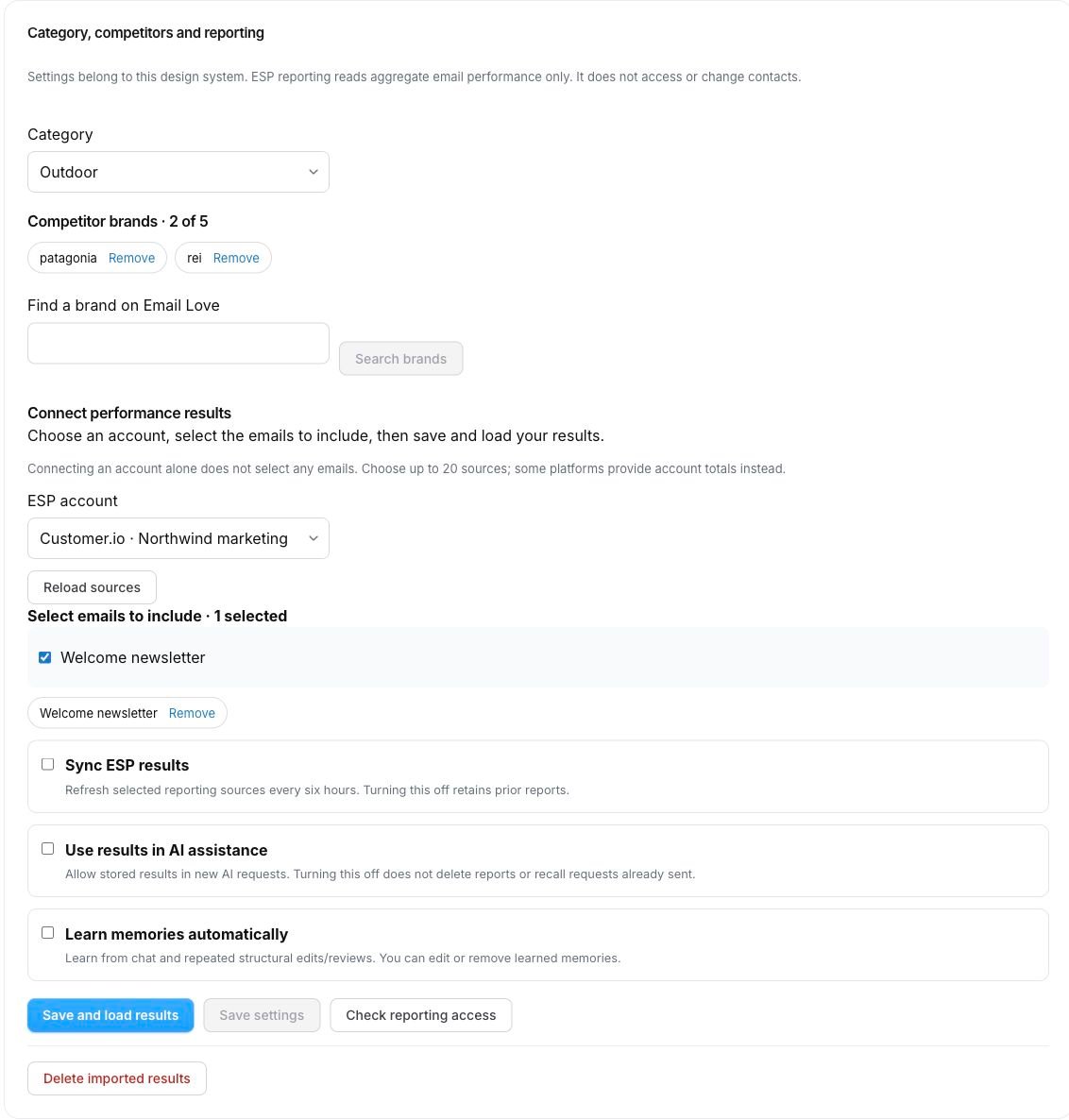
You can leave scheduled sync off and use Update now when needed. Importing results does not turn on AI use or automatic learning.If an integration appears under Other connected integrations, expand it to see why reporting is unavailable. See Current coverage limits.
Example configuration, using demonstration data. Choose sources, then click Save and load results. All three automatic controls are off here.
Choose what runs automatically
These three settings are independent, belong to the selected design system and start off.
Setting
What turning it on does
What turning it off does
Sync ESP results
Refreshes selected sources every six hours
Stops scheduled refreshes and keeps earlier reports
Use results in AI assistance
Allows stored customer results in new AI requests
Stops their use in new requests; it does not delete reports or recall a request already sent
Learn memories automatically
Learns lasting chat facts and repeated structural edit/review observations
Stops new automatic learning; existing memories keep their own controls
Click Save settings after changing a switch. You can use Reports with AI use off, or allow AI to use stored results while scheduled sync is off. Check the capture date when using older data.
Add category and competitor context
In Manage insight settings or AI knowledge → Competitors & results:
Choose your Category.
Use Find a brand on Email Love and Search brands to add up to five competitors.
Save.
Builder can draw on available category patterns, brand statistics, email examples and lifecycle journeys. It retrieves relevant evidence rather than putting the whole archive into every request.Category trends describes what brands send. It does not reveal competitors’ opens, clicks or revenue. Common send times and popular layouts are observations, not proof of better performance. Coverage, sample sizes and freshness can be unknown when the archive does not provide them.
Read a report
Each source has its own card with its provider, reporting scope, window and capture time. Some providers offer campaign results; others offer account, server or transactional totals.
7 / 14 / 30 days changes daily-bucket reports. Fixed-range, lifetime, snapshot and rolling-rate reports keep their original window, shown on the card. A fixed-range report normally covers the 30-day range requested at capture.
Unknown means the source did not supply a complete value. It is different from zero.
Opens and clicks may include automated activity. Human events and unique counts are labelled separately when available. Unique counts use the provider’s definition.
The current daily bucket may be incomplete. Results older than two days are marked stale.
Account or server totals can include emails created outside Builder. Reports do not identify which Builder revision reached recipients.
Builder does not combine incompatible reports into one total or rank designs across providers. A result can inform a question to test; it does not prove a particular layout or piece of copy caused that result. Revenue attribution and recipient-level drill-down are not included.
Illustrative counts only. Read the provider, reporting window and capture date before comparing results. Unknown means a metric was not supplied.
Turn evidence into a brief
When a finding is available, click View evidence to inspect its source and reporting window. Click Create brief to start a brief from it, then add your goal, audience, offer and dates before asking the Assistant to draft.With Use results in AI assistance enabled, relevant stored findings can also inform supported Assistant draft and edit requests automatically. Where an Assistant reply includes Why these choices, expand it and use View evidence to inspect its cited observations. A source being available does not mean every reply will cite it.For example: “Draft a welcome email using our brand instructions and relevant category examples. Explain any results you use.” Treat the output as a draft to review, with the same checks and sign-off as any other email.
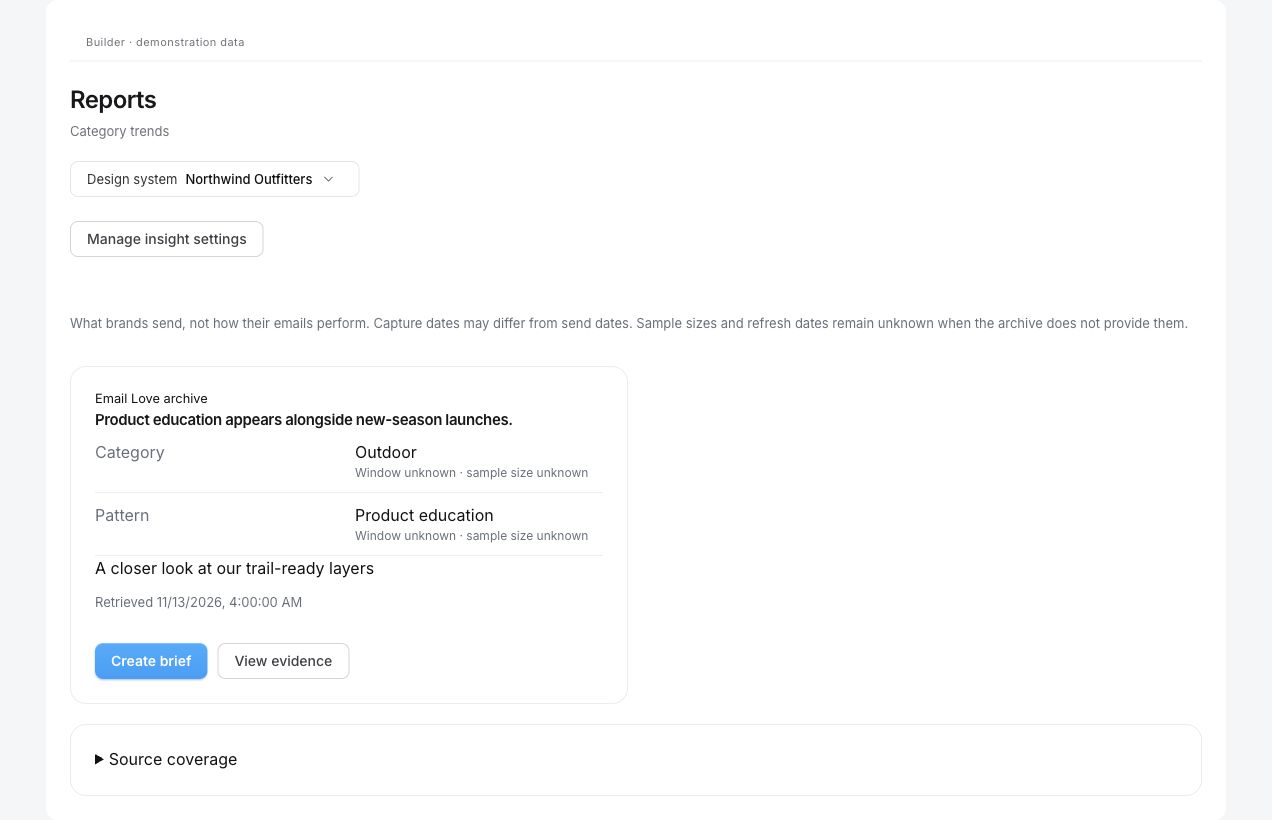
Demonstration data. Category observations describe what brands send. They do not prove which designs perform best.
Use View evidence to inspect the source and limitations before Create brief. This example uses fictional observations.
Results and memories are different
Reports holds observations. Your design system’s existing Memories page holds lasting facts and preferences. There is no second memory store to manage.Turning on automatic learning can add memories from chat and repeated structural edits or reviews. It does not turn each campaign result into a claim that a design wins. You can inspect, edit or remove learned memories. See Memories.
Supported platforms
Reporting support is subject to the connected account’s permissions. Use Check reporting access before relying on a source. These are reporting scopes, not a promise that every platform supplies every metric.
Provider-supplied reporting window, which can start on the send date. All buckets are included; fixed-range totals do not change with daily-window buttons. Selected email newsletters only; automated campaign actions, transactional messages and content variants are not included.
It is a template editing integration, not a sending-performance source.
Builder does not read contacts or individual events to fill these gaps.
Privacy and removing imported results
Customer results stay within their authorized workspace and design system. Source identities also include the provider and account, so matching campaign IDs from different accounts do not share results. There is no cross-customer pooling of private results.Imported reports and capture history are subject to a one-year retention limit. Stopping sync is not a permanent archive.These are private aggregate business records, not a claim of fully anonymous data. Reporting does not fetch contact profiles, addresses, audience membership, recipient exports, individual delivery events or clicked destination URLs. See Security.To remove imported results, open Manage insight settings, choose Delete imported results, then confirm Delete results and stop sync. This removes that design system’s imported reports and history, stops sync, disables AI use and clears its selected sources. It does not delete anything in your ESP or remove existing memories. Manage memories on the Memories page.
Troubleshooting
My account exports successfully but reporting fails. Check its reporting permissions, region and selected source ID. Export access and reporting access are separate. Update saved credentials in Integrations if needed, then run Check reporting access again. Do not add contact access to work around a reporting limitation.Check reporting access is disabled. Save your settings first and select at least one source.I can’t find a campaign. Use More sources where offered. Some providers expose only account totals or require a report ID. Make sure you selected the correct account and the right kind of ID from the coverage table.No results or no finding appears. Save a source, check access and click Update now. A refresh is queued, not instant. No finding can mean there is too little complete, recent evidence; it does not mean nothing was sent.Numbers differ from my ESP dashboard. Compare the same account, source, date basis, timezone and capture time. Check whether the provider is showing unique recipients, total events or filtered human activity. Fixed-range and lifetime cards do not change with the daily-window buttons.Some results are stale or unavailable. Check the latest refresh status and reporting permissions, then retry later. A failed refresh can leave earlier successful results visible. Keep category context available while you resolve the ESP connection.I can’t change settings. Ask a manager of this design system. Connecting or updating an ESP account in Integrations requires a workspace owner or admin.
{"docsConfig":{"theme":"mint","$schema":"https://mintlify.com/docs.json","name":"Email Love","colors":{"primary":"#E81A3F","light":"#EE3F5E","dark":"#EB3656"},"logo":{"light":"https://mintcdn.com/emaillove/zdvKWcm2hTqSKqVZ/logo/light.png?fit=max\u0026auto=format\u0026n=zdvKWcm2hTqSKqVZ\u0026q=85\u0026s=1d0cc0df4e2036624a1a61cb4e0a6938","dark":"https://mintcdn.com/emaillove/zdvKWcm2hTqSKqVZ/logo/dark.png?fit=max\u0026auto=format\u0026n=zdvKWcm2hTqSKqVZ\u0026q=85\u0026s=1ea50a0749925dca8777790b59abb046"},"favicon":"https://mintcdn.com/emaillove/zdvKWcm2hTqSKqVZ/favicon.png?fit=max\u0026auto=format\u0026n=zdvKWcm2hTqSKqVZ\u0026q=85\u0026s=0c16739dc1b58fa00ba58481eae48d5b","seo":{"metatags":{"canonical":"https://help.emaillove.com"}},"fonts":{"family":"Inter"},"integrations":{"plausible":{"domain":"help.emaillove.com"}},"interaction":{"drilldown":false},"styling":{"latex":true},"navigation":{"global":{"anchors":[{"anchor":"Community","icon":"slack","href":"https://emaillove.com/go/slack"}]},"pages":[]}},"deployment":{"deploymentMetadataValue":{"subdomain":"emaillove","hasAudioNarration":false,"actualSubdomain":"emaillove","customDomains":["help.emaillove.com"],"gitSource":{"type":"github","owner":"email-love","repo":"docs","deployBranch":"main","contentDirectory":"","isPrivate":true,"mountPath":"","label":""},"entitlements":{},"buildId":"6af789f5e968b373af238e3d","clientVersion":"0.0.4138","searchFilterCounts":[{"language":"default","tag":"Documentation","count":196},{"language":"default","tag":"Figma Plugin","count":115},{"language":"default","tag":"Builder","count":81},{"language":"default","tag":"Integrations","count":46},{"language":"default","tag":"ESP Integrations","count":32},{"language":"default","tag":"Email platforms","count":27},{"language":"default","tag":"Building with Components","count":13},{"language":"default","tag":"Styling","count":13},{"language":"default","tag":"Editor","count":8},{"language":"default","tag":"Asset libraries","count":8}]},"assistantConfig":{},"basePath":"","hasChatPermissions":false,"hasWebMcpPermissions":false,"toggles":[],"googleFontsInlined":false},"customCss":[],"page":{"pagePath":"builder/reports/email-insights","slug":"/builder/reports/email-insights","pageMetadata":{"title":"Email insights and reporting","sidebarTitle":"Email insights","description":"Bring ESP results and Email Love trends into Reports and AI assistance, with separate controls for sync, AI use and memory learning.","href":"/builder/reports/email-insights"},"description":{"compiledSource":"\"use strict\";\nconst {jsx: _jsx} = arguments[0];\nconst {useMDXComponents: _provideComponents} = arguments[0];\nfunction _createMdxContent(props) {\n const _components = {\n p: \"p\",\n ..._provideComponents(),\n ...props.components\n };\n return _jsx(_components.p, {\n children: \"Bring ESP results and Email Love trends into Reports and AI assistance, with separate controls for sync, AI use and memory learning.\"\n });\n}\nfunction MDXContent(props = {}) {\n const {wrapper: MDXLayout} = {\n ..._provideComponents(),\n ...props.components\n };\n return MDXLayout ? _jsx(MDXLayout, {\n ...props,\n children: _jsx(_createMdxContent, {\n ...props\n })\n }) : _createMdxContent(props);\n}\nreturn {\n default: MDXContent\n};\n","frontmatter":{},"scope":{}},"pageType":"default","mdx":{"mdxSource":{"compiledSource":"\"use strict\";const{Fragment:_Fragment,jsx:_jsx,jsxs:_jsxs}=arguments[0];const{useMDXComponents:_provideComponents}=arguments[0];function _createMdxContent(props){const _components={a:`a`,code:`code`,li:`li`,ol:`ol`,p:`p`,strong:`strong`,tbody:`tbody`,td:`td`,th:`th`,thead:`thead`,tr:`tr`,ul:`ul`,..._provideComponents(),...props.components},{Frame,Heading,Note,OptimizedImage,Table}=_components;if(!Frame)_missingMdxReference(`Frame`,true);if(!Heading)_missingMdxReference(`Heading`,true);if(!Note)_missingMdxReference(`Note`,true);if(!OptimizedImage)_missingMdxReference(`OptimizedImage`,true);if(!Table)_missingMdxReference(`Table`,true);return _jsxs(_Fragment,{children:[_jsx(_components.p,{children:`Builder brings your email platform’s aggregate results together with category trends, competitor examples and journeys from Email Love. Use them to review results, plan a brief, and give the Assistant more context when it drafts or edits an email.`}),`\n`,_jsxs(_components.p,{children:[`You don’t need to read a report before every draft. When `,_jsx(_components.strong,{children:`Use results in AI assistance`}),` is on for a design system, the Assistant can draw on its stored results alongside its brand knowledge. Category and competitor context can work without an ESP connection.`]}),`\n`,_jsx(Note,{children:_jsx(_components.p,{children:`Reporting reads aggregate email performance only. It does not access or change ESP contacts, recipient lists, individual deliveries, person-level events or clicked link destinations. Exporting an email and reading its results are separate capabilities.`})}),`\n`,_jsxs(_components.p,{children:[`For the complete setup-to-draft walkthrough, see `,_jsx(_components.a,{href:`/builder/reports/insights-workflow`,children:`Build emails with insights`}),`.`]}),`\n`,_jsx(Heading,{level:`2`,id:`where-to-find-it`,children:`Where to find it`}),`\n`,_jsxs(_components.p,{children:[`Open `,_jsx(_components.strong,{children:`Reports`}),` in the Builder sidebar:`]}),`\n`,_jsxs(_components.ul,{children:[`\n`,_jsxs(_components.li,{children:[_jsx(_components.strong,{children:`Production`}),` keeps your existing production reports.`]}),`\n`,_jsxs(_components.li,{children:[_jsx(_components.strong,{children:`Email performance`}),` shows results from the sources you choose for a design system.`]}),`\n`,_jsxs(_components.li,{children:[_jsx(_components.strong,{children:`Category trends`}),` shows observations from Email Love’s archive, including source coverage.`]}),`\n`]}),`\n`,_jsxs(_components.p,{children:[`Choose the design system at the top. Its category, competitor choices and reporting settings also live in `,_jsx(_components.strong,{children:`AI knowledge`}),` → `,_jsx(_components.strong,{children:`Competitors \u0026 results`}),`.`]}),`\n`,_jsx(Heading,{level:`2`,id:`connect-your-results`,children:`Connect your results`}),`\n`,_jsxs(_components.p,{children:[`Workspace owners and admins connect ESP accounts in `,_jsx(_components.strong,{children:`Integrations`}),`. A design-system manager then chooses which sources that design system uses.`]}),`\n`,_jsxs(_components.ol,{children:[`\n`,_jsxs(_components.li,{children:[`Connect the account in `,_jsx(_components.a,{href:`/builder/integrations/overview`,children:`Integrations`}),`, if it isn’t already connected in Builder. Credentials saved only in the Figma plugin do not set up Builder reporting.`]}),`\n`,_jsxs(_components.li,{children:[`Open `,_jsx(_components.strong,{children:`Reports`}),` → `,_jsx(_components.strong,{children:`Email performance`}),` and choose your design system.`]}),`\n`,_jsxs(_components.li,{children:[`Click `,_jsx(_components.strong,{children:`Manage insight settings`}),`.`]}),`\n`,_jsxs(_components.li,{children:[`Choose an `,_jsx(_components.strong,{children:`ESP account`}),`. Its reporting options load automatically.`]}),`\n`,_jsxs(_components.li,{children:[`Select the newsletters or campaigns offered by the picker. For account or server totals, select that aggregate source. For providers that ask for a `,_jsx(_components.strong,{children:`Report ID`}),`, enter the ID described in the `,_jsx(_components.a,{href:`#supported-platforms`,children:`coverage table`}),` and click `,_jsx(_components.strong,{children:`Add report`}),`. You can select up to 20 sources across connected accounts.`]}),`\n`,_jsxs(_components.li,{children:[`Click `,_jsx(_components.strong,{children:`Save and load results`}),` to save your selection and queue the import. Saving a connection for exports does not guarantee its key can read reports. Your key or provider role may need additional reporting permission.`]}),`\n`,_jsxs(_components.li,{children:[`The report updates when the queued import finishes. Click `,_jsx(_components.strong,{children:`Update now`}),` for a later manual refresh.`]}),`\n`,_jsxs(_components.li,{children:[`For regular refreshes, turn on `,_jsx(_components.strong,{children:`Sync ESP results`}),` and save. Builder refreshes selected sources every six hours.`]}),`\n`]}),`\n`,_jsxs(_components.p,{children:[`You can leave scheduled sync off and use `,_jsx(_components.strong,{children:`Update now`}),` when needed. Importing results does not turn on AI use or automatic learning.`]}),`\n`,_jsxs(_components.p,{children:[`If an integration appears under `,_jsx(_components.strong,{children:`Other connected integrations`}),`, expand it to see why reporting is unavailable. See `,_jsx(_components.a,{href:`#current-coverage-limits`,children:`Current coverage limits`}),`.`]}),`\n`,_jsx(Frame,{caption:`Example configuration, using demonstration data. Choose sources, then click Save and load results. All three automatic controls are off here.`,children:_jsx(OptimizedImage,{src:`https://mintcdn.com/emaillove/FS7WzjZwdQPHA7Em/images/builder/guides/insight-settings-updated.png?fit=max\u0026auto=format\u0026n=FS7WzjZwdQPHA7Em\u0026q=85\u0026s=01490ff707992b11f5d0628f882aeccd`,alt:`Insight settings with category, competitor brands, reporting source and sync controls`,\"data-og-width\":`1132`,width:`1132`,\"data-og-height\":`1186`,height:`1186`,\"data-path\":`images/builder/guides/insight-settings-updated.png`,\"data-optimize\":`true`,\"data-opv\":`3`,srcset:`https://mintcdn.com/emaillove/FS7WzjZwdQPHA7Em/images/builder/guides/insight-settings-updated.png?w=280\u0026fit=max\u0026auto=format\u0026n=FS7WzjZwdQPHA7Em\u0026q=85\u0026s=7b1f4d64ba1363faafbf6ddb1ab8245c 280w, https://mintcdn.com/emaillove/FS7WzjZwdQPHA7Em/images/builder/guides/insight-settings-updated.png?w=560\u0026fit=max\u0026auto=format\u0026n=FS7WzjZwdQPHA7Em\u0026q=85\u0026s=7dc32c5bdfd36f9b8217eb29eeb90b13 560w, https://mintcdn.com/emaillove/FS7WzjZwdQPHA7Em/images/builder/guides/insight-settings-updated.png?w=840\u0026fit=max\u0026auto=format\u0026n=FS7WzjZwdQPHA7Em\u0026q=85\u0026s=32f723e57cc2eae8bb7105b61e0d8f18 840w, https://mintcdn.com/emaillove/FS7WzjZwdQPHA7Em/images/builder/guides/insight-settings-updated.png?w=1100\u0026fit=max\u0026auto=format\u0026n=FS7WzjZwdQPHA7Em\u0026q=85\u0026s=81ca0d819671abf467de9577de74751c 1100w, https://mintcdn.com/emaillove/FS7WzjZwdQPHA7Em/images/builder/guides/insight-settings-updated.png?w=1650\u0026fit=max\u0026auto=format\u0026n=FS7WzjZwdQPHA7Em\u0026q=85\u0026s=068de2f48e41584c83623c5b49827759 1650w, https://mintcdn.com/emaillove/FS7WzjZwdQPHA7Em/images/builder/guides/insight-settings-updated.png?w=2500\u0026fit=max\u0026auto=format\u0026n=FS7WzjZwdQPHA7Em\u0026q=85\u0026s=31a988957560da63fad67b35cbe0bd07 2500w`})}),`\n`,_jsx(Heading,{level:`2`,id:`choose-what-runs-automatically`,children:`Choose what runs automatically`}),`\n`,_jsx(_components.p,{children:`These three settings are independent, belong to the selected design system and start off.`}),`\n`,_jsxs(Table,{children:[_jsx(_components.thead,{children:_jsxs(_components.tr,{children:[_jsx(_components.th,{children:`Setting`}),_jsx(_components.th,{children:`What turning it on does`}),_jsx(_components.th,{children:`What turning it off does`})]})}),_jsxs(_components.tbody,{children:[_jsxs(_components.tr,{children:[_jsx(_components.td,{children:_jsx(_components.strong,{children:`Sync ESP results`})}),_jsx(_components.td,{children:`Refreshes selected sources every six hours`}),_jsx(_components.td,{children:`Stops scheduled refreshes and keeps earlier reports`})]}),_jsxs(_components.tr,{children:[_jsx(_components.td,{children:_jsx(_components.strong,{children:`Use results in AI assistance`})}),_jsx(_components.td,{children:`Allows stored customer results in new AI requests`}),_jsx(_components.td,{children:`Stops their use in new requests; it does not delete reports or recall a request already sent`})]}),_jsxs(_components.tr,{children:[_jsx(_components.td,{children:_jsx(_components.strong,{children:`Learn memories automatically`})}),_jsx(_components.td,{children:`Learns lasting chat facts and repeated structural edit/review observations`}),_jsx(_components.td,{children:`Stops new automatic learning; existing memories keep their own controls`})]})]})]}),`\n`,_jsxs(_components.p,{children:[`Click `,_jsx(_components.strong,{children:`Save settings`}),` after changing a switch. You can use Reports with AI use off, or allow AI to use stored results while scheduled sync is off. Check the capture date when using older data.`]}),`\n`,_jsx(Heading,{level:`2`,id:`add-category-and-competitor-context`,children:`Add category and competitor context`}),`\n`,_jsxs(_components.p,{children:[`In `,_jsx(_components.strong,{children:`Manage insight settings`}),` or `,_jsx(_components.strong,{children:`AI knowledge`}),` → `,_jsx(_components.strong,{children:`Competitors \u0026 results`}),`:`]}),`\n`,_jsxs(_components.ol,{children:[`\n`,_jsxs(_components.li,{children:[`Choose your `,_jsx(_components.strong,{children:`Category`}),`.`]}),`\n`,_jsxs(_components.li,{children:[`Use `,_jsx(_components.strong,{children:`Find a brand on Email Love`}),` and `,_jsx(_components.strong,{children:`Search brands`}),` to add up to five competitors.`]}),`\n`,_jsx(_components.li,{children:`Save.`}),`\n`]}),`\n`,_jsx(_components.p,{children:`Builder can draw on available category patterns, brand statistics, email examples and lifecycle journeys. It retrieves relevant evidence rather than putting the whole archive into every request.`}),`\n`,_jsxs(_components.p,{children:[_jsx(_components.strong,{children:`Category trends`}),` describes what brands send. It does not reveal competitors’ opens, clicks or revenue. Common send times and popular layouts are observations, not proof of better performance. Coverage, sample sizes and freshness can be unknown when the archive does not provide them.`]}),`\n`,_jsx(Heading,{level:`2`,id:`read-a-report`,children:`Read a report`}),`\n`,_jsx(_components.p,{children:`Each source has its own card with its provider, reporting scope, window and capture time. Some providers offer campaign results; others offer account, server or transactional totals.`}),`\n`,_jsxs(_components.ul,{children:[`\n`,_jsxs(_components.li,{children:[_jsx(_components.strong,{children:`7 / 14 / 30 days`}),` changes daily-bucket reports. Fixed-range, lifetime, snapshot and rolling-rate reports keep their original window, shown on the card. A fixed-range report normally covers the 30-day range requested at capture.`]}),`\n`,_jsxs(_components.li,{children:[_jsx(_components.strong,{children:`Unknown`}),` means the source did not supply a complete value. It is different from zero.`]}),`\n`,_jsx(_components.li,{children:`Opens and clicks may include automated activity. Human events and unique counts are labelled separately when available. Unique counts use the provider’s definition.`}),`\n`,_jsx(_components.li,{children:`The current daily bucket may be incomplete. Results older than two days are marked stale.`}),`\n`,_jsx(_components.li,{children:`Account or server totals can include emails created outside Builder. Reports do not identify which Builder revision reached recipients.`}),`\n`]}),`\n`,_jsx(_components.p,{children:`Builder does not combine incompatible reports into one total or rank designs across providers. A result can inform a question to test; it does not prove a particular layout or piece of copy caused that result. Revenue attribution and recipient-level drill-down are not included.`}),`\n`,_jsx(Frame,{caption:`Illustrative counts only. Read the provider, reporting window and capture date before comparing results. Unknown means a metric was not supplied.`,children:_jsx(OptimizedImage,{src:`https://mintcdn.com/emaillove/FS7WzjZwdQPHA7Em/images/builder/guides/email-performance-updated.png?fit=max\u0026auto=format\u0026n=FS7WzjZwdQPHA7Em\u0026q=85\u0026s=d544dc200ed4e61a356d6919c5e1a692`,alt:`Email performance report showing a selected source, capture window and available or unknown metrics`,\"data-og-width\":`1180`,width:`1180`,\"data-og-height\":`1237`,height:`1237`,\"data-path\":`images/builder/guides/email-performance-updated.png`,\"data-optimize\":`true`,\"data-opv\":`3`,srcset:`https://mintcdn.com/emaillove/FS7WzjZwdQPHA7Em/images/builder/guides/email-performance-updated.png?w=280\u0026fit=max\u0026auto=format\u0026n=FS7WzjZwdQPHA7Em\u0026q=85\u0026s=b6fb32244255ba6af90dcd2188b60565 280w, https://mintcdn.com/emaillove/FS7WzjZwdQPHA7Em/images/builder/guides/email-performance-updated.png?w=560\u0026fit=max\u0026auto=format\u0026n=FS7WzjZwdQPHA7Em\u0026q=85\u0026s=d3672ab79a830e7cf7f3b685b6d4a79a 560w, https://mintcdn.com/emaillove/FS7WzjZwdQPHA7Em/images/builder/guides/email-performance-updated.png?w=840\u0026fit=max\u0026auto=format\u0026n=FS7WzjZwdQPHA7Em\u0026q=85\u0026s=5820aa816e1b7742d30096d5f7212ab3 840w, https://mintcdn.com/emaillove/FS7WzjZwdQPHA7Em/images/builder/guides/email-performance-updated.png?w=1100\u0026fit=max\u0026auto=format\u0026n=FS7WzjZwdQPHA7Em\u0026q=85\u0026s=14bceaf66d465784bc7020b7d25c84dd 1100w, https://mintcdn.com/emaillove/FS7WzjZwdQPHA7Em/images/builder/guides/email-performance-updated.png?w=1650\u0026fit=max\u0026auto=format\u0026n=FS7WzjZwdQPHA7Em\u0026q=85\u0026s=78876436f1a4f6a11f4d892c8a88262d 1650w, https://mintcdn.com/emaillove/FS7WzjZwdQPHA7Em/images/builder/guides/email-performance-updated.png?w=2500\u0026fit=max\u0026auto=format\u0026n=FS7WzjZwdQPHA7Em\u0026q=85\u0026s=addbc058d90362eb83b24a4aa77de17c 2500w`})}),`\n`,_jsx(Heading,{level:`2`,id:`turn-evidence-into-a-brief`,children:`Turn evidence into a brief`}),`\n`,_jsxs(_components.p,{children:[`When a finding is available, click `,_jsx(_components.strong,{children:`View evidence`}),` to inspect its source and reporting window. Click `,_jsx(_components.strong,{children:`Create brief`}),` to start a brief from it, then add your goal, audience, offer and dates before asking the Assistant to draft.`]}),`\n`,_jsxs(_components.p,{children:[`With `,_jsx(_components.strong,{children:`Use results in AI assistance`}),` enabled, relevant stored findings can also inform supported Assistant draft and edit requests automatically. Where an Assistant reply includes `,_jsx(_components.strong,{children:`Why these choices`}),`, expand it and use `,_jsx(_components.strong,{children:`View evidence`}),` to inspect its cited observations. A source being available does not mean every reply will cite it.`]}),`\n`,_jsx(_components.p,{children:`For example: “Draft a welcome email using our brand instructions and relevant category examples. Explain any results you use.” Treat the output as a draft to review, with the same checks and sign-off as any other email.`}),`\n`,_jsx(Frame,{caption:`Demonstration data. Category observations describe what brands send. They do not prove which designs perform best.`,children:_jsx(OptimizedImage,{src:`https://mintcdn.com/emaillove/qYrzRKTscc4O0qPw/images/builder/guides/category-trends.jpg?fit=max\u0026auto=format\u0026n=qYrzRKTscc4O0qPw\u0026q=85\u0026s=724e787de27121da4281caccb5c87023`,alt:`Category trends observation with Create brief and View evidence actions`,\"data-og-width\":`1272`,width:`1272`,\"data-og-height\":`820`,height:`820`,\"data-path\":`images/builder/guides/category-trends.jpg`,\"data-optimize\":`true`,\"data-opv\":`3`,srcset:`https://mintcdn.com/emaillove/qYrzRKTscc4O0qPw/images/builder/guides/category-trends.jpg?w=280\u0026fit=max\u0026auto=format\u0026n=qYrzRKTscc4O0qPw\u0026q=85\u0026s=fc1ceb15eaa0bccd64775a17aaeb68ad 280w, https://mintcdn.com/emaillove/qYrzRKTscc4O0qPw/images/builder/guides/category-trends.jpg?w=560\u0026fit=max\u0026auto=format\u0026n=qYrzRKTscc4O0qPw\u0026q=85\u0026s=35f08094dbd617b66bfec057a32bcdce 560w, https://mintcdn.com/emaillove/qYrzRKTscc4O0qPw/images/builder/guides/category-trends.jpg?w=840\u0026fit=max\u0026auto=format\u0026n=qYrzRKTscc4O0qPw\u0026q=85\u0026s=331a90146152bac5dc140904772a8305 840w, https://mintcdn.com/emaillove/qYrzRKTscc4O0qPw/images/builder/guides/category-trends.jpg?w=1100\u0026fit=max\u0026auto=format\u0026n=qYrzRKTscc4O0qPw\u0026q=85\u0026s=23fdee7c197865ff556003dabbe6f70d 1100w, https://mintcdn.com/emaillove/qYrzRKTscc4O0qPw/images/builder/guides/category-trends.jpg?w=1650\u0026fit=max\u0026auto=format\u0026n=qYrzRKTscc4O0qPw\u0026q=85\u0026s=af45b61bfd625152b00d873051838327 1650w, https://mintcdn.com/emaillove/qYrzRKTscc4O0qPw/images/builder/guides/category-trends.jpg?w=2500\u0026fit=max\u0026auto=format\u0026n=qYrzRKTscc4O0qPw\u0026q=85\u0026s=67bc9f086521e420a3b3a68ee0a330a2 2500w`})}),`\n`,_jsx(Frame,{caption:`Use View evidence to inspect the source and limitations before Create brief. This example uses fictional observations.`,children:_jsx(OptimizedImage,{src:`https://mintcdn.com/emaillove/qYrzRKTscc4O0qPw/images/builder/guides/insight-evidence.jpg?fit=max\u0026auto=format\u0026n=qYrzRKTscc4O0qPw\u0026q=85\u0026s=5aeddc26bf46cefb765dc045fae657ae`,alt:`Evidence drawer with the observation source, example subject and limitations`,width:`560`,\"data-og-width\":`560`,\"data-og-height\":`720`,\"data-path\":`images/builder/guides/insight-evidence.jpg`,\"data-optimize\":`true`,\"data-opv\":`3`,srcset:`https://mintcdn.com/emaillove/qYrzRKTscc4O0qPw/images/builder/guides/insight-evidence.jpg?w=280\u0026fit=max\u0026auto=format\u0026n=qYrzRKTscc4O0qPw\u0026q=85\u0026s=98b3dac389a09e55e489a181a911ac67 280w, https://mintcdn.com/emaillove/qYrzRKTscc4O0qPw/images/builder/guides/insight-evidence.jpg?w=560\u0026fit=max\u0026auto=format\u0026n=qYrzRKTscc4O0qPw\u0026q=85\u0026s=3f6ca61c839800479c3b7ea6239aeeac 560w, https://mintcdn.com/emaillove/qYrzRKTscc4O0qPw/images/builder/guides/insight-evidence.jpg?w=840\u0026fit=max\u0026auto=format\u0026n=qYrzRKTscc4O0qPw\u0026q=85\u0026s=1d9bdf7ce831f1e4c6c3ad553e29b3fa 840w, https://mintcdn.com/emaillove/qYrzRKTscc4O0qPw/images/builder/guides/insight-evidence.jpg?w=1100\u0026fit=max\u0026auto=format\u0026n=qYrzRKTscc4O0qPw\u0026q=85\u0026s=f890e385e25fa1a98e531165551f7c6d 1100w, https://mintcdn.com/emaillove/qYrzRKTscc4O0qPw/images/builder/guides/insight-evidence.jpg?w=1650\u0026fit=max\u0026auto=format\u0026n=qYrzRKTscc4O0qPw\u0026q=85\u0026s=253670d657e8e1850478fb239f3ee14f 1650w, https://mintcdn.com/emaillove/qYrzRKTscc4O0qPw/images/builder/guides/insight-evidence.jpg?w=2500\u0026fit=max\u0026auto=format\u0026n=qYrzRKTscc4O0qPw\u0026q=85\u0026s=46fe800a1ac1e0e23697792d2667346b 2500w`})}),`\n`,_jsx(Heading,{level:`2`,id:`results-and-memories-are-different`,children:`Results and memories are different`}),`\n`,_jsxs(_components.p,{children:[`Reports holds observations. Your design system’s existing `,_jsx(_components.strong,{children:`Memories`}),` page holds lasting facts and preferences. There is no second memory store to manage.`]}),`\n`,_jsxs(_components.p,{children:[`Turning on automatic learning can add memories from chat and repeated structural edits or reviews. It does not turn each campaign result into a claim that a design wins. You can inspect, edit or remove learned memories. See `,_jsx(_components.a,{href:`/builder/ai/knowledge#memories`,children:`Memories`}),`.`]}),`\n`,_jsx(Heading,{level:`2`,id:`supported-platforms`,children:`Supported platforms`}),`\n`,_jsxs(_components.p,{children:[`Reporting support is subject to the connected account’s permissions. Use `,_jsx(_components.strong,{children:`Check reporting access`}),` before relying on a source. These are reporting scopes, not a promise that every platform supplies every metric.`]}),`\n`,_jsxs(Table,{children:[_jsx(_components.thead,{children:_jsxs(_components.tr,{children:[_jsx(_components.th,{children:`Platform`}),_jsx(_components.th,{children:`Source to choose`}),_jsx(_components.th,{children:`Window and limits`})]})}),_jsxs(_components.tbody,{children:[_jsxs(_components.tr,{children:[_jsx(_components.td,{children:_jsx(_components.strong,{children:_jsx(_components.a,{href:`/builder/integrations/customerio`,children:`Customer.io`})})}),_jsx(_components.td,{children:`Newsletter from the picker`}),_jsx(_components.td,{children:`Provider-supplied reporting window, which can start on the send date. All buckets are included; fixed-range totals do not change with daily-window buttons. Selected email newsletters only; automated campaign actions, transactional messages and content variants are not included.`})]}),_jsxs(_components.tr,{children:[_jsx(_components.td,{children:_jsx(_components.strong,{children:_jsx(_components.a,{href:`/builder/integrations/braze`,children:`Braze`})})}),_jsx(_components.td,{children:`Campaign from the picker`}),_jsx(_components.td,{children:`Daily campaign email metrics. Other message channels are excluded.`})]}),_jsxs(_components.tr,{children:[_jsx(_components.td,{children:_jsx(_components.strong,{children:_jsx(_components.a,{href:`/builder/integrations/iterable`,children:`Iterable`})})}),_jsx(_components.td,{children:`Email campaign from the picker`}),_jsx(_components.td,{children:`Fixed UTC activity range.`})]}),_jsxs(_components.tr,{children:[_jsx(_components.td,{children:_jsx(_components.strong,{children:_jsx(_components.a,{href:`/builder/integrations/klaviyo`,children:`Klaviyo`})})}),_jsx(_components.td,{children:`Campaign from the picker`}),_jsx(_components.td,{children:`Fixed UTC range based on when campaign messages were sent, not a daily activity chart. Flows and revenue are not included.`})]}),_jsxs(_components.tr,{children:[_jsx(_components.td,{children:_jsx(_components.strong,{children:_jsx(_components.a,{href:`/builder/integrations/mailchimp`,children:`Mailchimp`})})}),_jsx(_components.td,{children:`Campaign from the picker`}),_jsx(_components.td,{children:`Campaign lifetime totals.`})]}),_jsxs(_components.tr,{children:[_jsx(_components.td,{children:_jsx(_components.strong,{children:_jsx(_components.a,{href:`/builder/integrations/sendgrid`,children:`SendGrid`})})}),_jsx(_components.td,{children:`Account totals`}),_jsx(_components.td,{children:`Daily UTC email statistics.`})]}),_jsxs(_components.tr,{children:[_jsx(_components.td,{children:_jsx(_components.strong,{children:_jsx(_components.a,{href:`/builder/integrations/netcore`,children:`Netcore`})})}),_jsx(_components.td,{children:`Account totals`}),_jsx(_components.td,{children:`Daily email statistics through the connected non-EU endpoint. Recipient-domain breakdowns are excluded.`})]}),_jsxs(_components.tr,{children:[_jsx(_components.td,{children:_jsx(_components.strong,{children:_jsx(_components.a,{href:`/builder/integrations/postmark`,children:`Postmark`})})}),_jsx(_components.td,{children:`Server totals`}),_jsx(_components.td,{children:`Outbound email in a fixed range, using the provider’s EST reporting timezone.`})]}),_jsxs(_components.tr,{children:[_jsx(_components.td,{children:_jsx(_components.strong,{children:_jsx(_components.a,{href:`/builder/integrations/brevo`,children:`Brevo`})})}),_jsx(_components.td,{children:`Transactional account totals`}),_jsx(_components.td,{children:`Fixed-range transactional email statistics, not marketing campaign reports.`})]}),_jsxs(_components.tr,{children:[_jsx(_components.td,{children:_jsx(_components.strong,{children:_jsx(_components.a,{href:`/builder/integrations/mailjet`,children:`Mailjet`})})}),_jsx(_components.td,{children:`Account totals`}),_jsx(_components.td,{children:`Lifetime email counters for the connected API key.`})]}),_jsxs(_components.tr,{children:[_jsx(_components.td,{children:_jsx(_components.strong,{children:_jsx(_components.a,{href:`/builder/integrations/hubspot`,children:`HubSpot`})})}),_jsx(_components.td,{children:`Account totals`}),_jsx(_components.td,{children:`Sent and delivered counts for marketing emails in the requested send-date range. Opens and clicks are not included.`})]}),_jsxs(_components.tr,{children:[_jsx(_components.td,{children:_jsx(_components.strong,{children:_jsx(_components.a,{href:`/builder/integrations/onesignal`,children:`OneSignal`})})}),_jsx(_components.td,{children:`App totals`}),_jsx(_components.td,{children:`Rolling 30-day email bounce and complaint rates at capture. Event counts are not supplied.`})]}),_jsxs(_components.tr,{children:[_jsx(_components.td,{children:_jsx(_components.strong,{children:_jsx(_components.a,{href:`/builder/integrations/sailthru`,children:`Sailthru`})})}),_jsx(_components.td,{children:`Account campaign totals`}),_jsx(_components.td,{children:`Fixed-range campaign email statistics.`})]}),_jsxs(_components.tr,{children:[_jsx(_components.td,{children:_jsx(_components.strong,{children:_jsx(_components.a,{href:`/builder/integrations/salesforce-marketing-cloud`,children:`Salesforce Marketing Cloud`})})}),_jsx(_components.td,{children:`Enter a numeric send job ID`}),_jsx(_components.td,{children:`Send-job lifetime totals. Use the send job ID, not the exported template ID.`})]}),_jsxs(_components.tr,{children:[_jsx(_components.td,{children:_jsx(_components.strong,{children:_jsx(_components.a,{href:`/builder/integrations/pardot`,children:`Account Engagement / Pardot`})})}),_jsx(_components.td,{children:`Enter a numeric list email ID`}),_jsx(_components.td,{children:`List-email lifetime totals, not template statistics.`})]}),_jsxs(_components.tr,{children:[_jsx(_components.td,{children:_jsx(_components.strong,{children:_jsx(_components.a,{href:`/builder/integrations/activecampaign`,children:`ActiveCampaign`})})}),_jsx(_components.td,{children:`Enter a numeric campaign ID`}),_jsx(_components.td,{children:`Campaign lifetime totals, not template statistics.`})]}),_jsxs(_components.tr,{children:[_jsx(_components.td,{children:_jsx(_components.strong,{children:_jsx(_components.a,{href:`/builder/integrations/acoustic`,children:`Acoustic`})})}),_jsxs(_components.td,{children:[`Enter `,_jsx(_components.code,{children:`mailingID:reportID`})]}),_jsxs(_components.td,{children:[`Lifetime totals for that mailing/report pair. For example, `,_jsx(_components.code,{children:`123:456`}),`. Link and domain breakdowns are excluded.`]})]}),_jsxs(_components.tr,{children:[_jsx(_components.td,{children:_jsx(_components.strong,{children:_jsx(_components.a,{href:`/builder/integrations/emarsys`,children:`Emarsys`})})}),_jsx(_components.td,{children:`Enter a numeric campaign ID`}),_jsx(_components.td,{children:`Totals across campaign launches. Opens and cross-launch unique counts are not included.`})]}),_jsxs(_components.tr,{children:[_jsx(_components.td,{children:_jsx(_components.strong,{children:_jsx(_components.a,{href:`/builder/integrations/mailerlite-classic`,children:`MailerLite Classic`})})}),_jsx(_components.td,{children:`Account snapshot`}),_jsx(_components.td,{children:`Sent count only. The provider does not specify the reporting period for this snapshot. Subscriber counts and rates are excluded.`})]})]})]}),`\n`,_jsx(Heading,{level:`3`,id:`current-coverage-limits`,children:`Current coverage limits`}),`\n`,_jsx(_components.p,{children:`The following connections do not currently provide reporting in Builder. Their export features are separate.`}),`\n`,_jsxs(Table,{children:[_jsx(_components.thead,{children:_jsxs(_components.tr,{children:[_jsx(_components.th,{children:`Platform`}),_jsx(_components.th,{children:`Why reporting is unavailable`})]})}),_jsxs(_components.tbody,{children:[_jsxs(_components.tr,{children:[_jsx(_components.td,{children:_jsx(_components.strong,{children:`SendX and beehiiv`})}),_jsx(_components.td,{children:`The inspected reports include clicked URLs without a verified way to exclude them.`})]}),_jsxs(_components.tr,{children:[_jsx(_components.td,{children:_jsx(_components.strong,{children:`Current MailerLite`})}),_jsx(_components.td,{children:`Campaign responses include recipient filters without a verified safe alternative. MailerLite Classic has the limited snapshot described above.`})]}),_jsxs(_components.tr,{children:[_jsx(_components.td,{children:_jsx(_components.strong,{children:_jsx(_components.a,{href:`/builder/integrations/airship`,children:`Airship`})})}),_jsx(_components.td,{children:`The documented reporting API covers push platforms; an email reporting endpoint has not been verified.`})]}),_jsxs(_components.tr,{children:[_jsx(_components.td,{children:_jsx(_components.strong,{children:`Marketo and Zeta`})}),_jsx(_components.td,{children:`An aggregate-only email reporting endpoint for these integrations has not been verified.`})]}),_jsxs(_components.tr,{children:[_jsx(_components.td,{children:_jsx(_components.strong,{children:_jsx(_components.a,{href:`/builder/integrations/moengage`,children:`MoEngage`})})}),_jsx(_components.td,{children:`Campaign reporting exists, but its email-only metric mapping still needs verification.`})]}),_jsxs(_components.tr,{children:[_jsx(_components.td,{children:_jsx(_components.strong,{children:_jsx(_components.a,{href:`/builder/integrations/blueshift`,children:`Blueshift`})})}),_jsx(_components.td,{children:`Campaign reporting exists, but its response schema and email-only privacy boundary still need verification.`})]}),_jsxs(_components.tr,{children:[_jsx(_components.td,{children:_jsx(_components.strong,{children:_jsx(_components.a,{href:`/builder/integrations/stripo`,children:`Stripo`})})}),_jsx(_components.td,{children:`It is a template editing integration, not a sending-performance source.`})]})]})]}),`\n`,_jsx(_components.p,{children:`Builder does not read contacts or individual events to fill these gaps.`}),`\n`,_jsx(Heading,{level:`2`,id:`privacy-and-removing-imported-results`,children:`Privacy and removing imported results`}),`\n`,_jsx(_components.p,{children:`Customer results stay within their authorized workspace and design system. Source identities also include the provider and account, so matching campaign IDs from different accounts do not share results. There is no cross-customer pooling of private results.`}),`\n`,_jsx(_components.p,{children:`Imported reports and capture history are subject to a one-year retention limit. Stopping sync is not a permanent archive.`}),`\n`,_jsxs(_components.p,{children:[`These are private aggregate business records, not a claim of fully anonymous data. Reporting does not fetch contact profiles, addresses, audience membership, recipient exports, individual delivery events or clicked destination URLs. See `,_jsx(_components.a,{href:`/builder/team/security#email-reporting-data`,children:`Security`}),`.`]}),`\n`,_jsxs(_components.p,{children:[`To remove imported results, open `,_jsx(_components.strong,{children:`Manage insight settings`}),`, choose `,_jsx(_components.strong,{children:`Delete imported results`}),`, then confirm `,_jsx(_components.strong,{children:`Delete results and stop sync`}),`. This removes that design system’s imported reports and history, stops sync, disables AI use and clears its selected sources. It does not delete anything in your ESP or remove existing memories. Manage memories on the `,_jsx(_components.strong,{children:`Memories`}),` page.`]}),`\n`,_jsx(Heading,{level:`2`,id:`troubleshooting`,children:`Troubleshooting`}),`\n`,_jsxs(_components.p,{children:[_jsx(_components.strong,{children:`My account exports successfully but reporting fails.`}),` Check its reporting permissions, region and selected source ID. Export access and reporting access are separate. Update saved credentials in Integrations if needed, then run `,_jsx(_components.strong,{children:`Check reporting access`}),` again. Do not add contact access to work around a reporting limitation.`]}),`\n`,_jsxs(_components.p,{children:[_jsx(_components.strong,{children:`Check reporting access is disabled.`}),` Save your settings first and select at least one source.`]}),`\n`,_jsxs(_components.p,{children:[_jsx(_components.strong,{children:`I can’t find a campaign.`}),` Use `,_jsx(_components.strong,{children:`More sources`}),` where offered. Some providers expose only account totals or require a report ID. Make sure you selected the correct account and the right kind of ID from the coverage table.`]}),`\n`,_jsxs(_components.p,{children:[_jsx(_components.strong,{children:`No results or no finding appears.`}),` Save a source, check access and click `,_jsx(_components.strong,{children:`Update now`}),`. A refresh is queued, not instant. No finding can mean there is too little complete, recent evidence; it does not mean nothing was sent.`]}),`\n`,_jsxs(_components.p,{children:[_jsx(_components.strong,{children:`Numbers differ from my ESP dashboard.`}),` Compare the same account, source, date basis, timezone and capture time. Check whether the provider is showing unique recipients, total events or filtered human activity. Fixed-range and lifetime cards do not change with the daily-window buttons.`]}),`\n`,_jsxs(_components.p,{children:[_jsx(_components.strong,{children:`Some results are stale or unavailable.`}),` Check the latest refresh status and reporting permissions, then retry later. A failed refresh can leave earlier successful results visible. Keep category context available while you resolve the ESP connection.`]}),`\n`,_jsxs(_components.p,{children:[_jsx(_components.strong,{children:`I can’t change settings.`}),` Ask a manager of this design system. Connecting or updating an ESP account in Integrations requires a workspace owner or admin.`]})]})}function MDXContent(props={}){const{wrapper:MDXLayout}={..._provideComponents(),...props.components};return MDXLayout?_jsx(MDXLayout,{...props,children:_jsx(_createMdxContent,{...props})}):_createMdxContent(props)}return{default:MDXContent};function _missingMdxReference(id,component){throw new Error(`Expected `+(component?`component`:`object`)+\" `\"+id+\"` to be defined: you likely forgot to import, pass, or provide it.\")}","frontmatter":{},"scope":{"config":{},"pageMetadata":{"title":"Email insights and reporting","sidebarTitle":"Email insights","description":"Bring ESP results and Email Love trends into Reports and AI assistance, with separate controls for sync, AI use and memory learning.","href":"/builder/reports/email-insights"}}},"mdxSourceWithNoJs":null},"mdxExtracts":{"tableOfContents":[{"title":"Where to find it","slug":"where-to-find-it","depth":2,"children":[]},{"title":"Connect your results","slug":"connect-your-results","depth":2,"children":[]},{"title":"Choose what runs automatically","slug":"choose-what-runs-automatically","depth":2,"children":[]},{"title":"Add category and competitor context","slug":"add-category-and-competitor-context","depth":2,"children":[]},{"title":"Read a report","slug":"read-a-report","depth":2,"children":[]},{"title":"Turn evidence into a brief","slug":"turn-evidence-into-a-brief","depth":2,"children":[]},{"title":"Results and memories are different","slug":"results-and-memories-are-different","depth":2,"children":[]},{"title":"Supported platforms","slug":"supported-platforms","depth":2,"children":[{"title":"Current coverage limits","slug":"current-coverage-limits","depth":3,"children":[]}]},{"title":"Privacy and removing imported results","slug":"privacy-and-removing-imported-results","depth":2,"children":[]},{"title":"Troubleshooting","slug":"troubleshooting","depth":2,"children":[]}],"codeExamples":{}},"jsLinks":[],"subdomain":"emaillove","siteName":"Email Love","title":"Email insights and reporting - Email Love","navMaps":{"firstHrefInVersion":{},"firstHrefInLanguage":{}},"lastModified":"2026-11-13T22:06:50.161Z","originalFileLocation":"builder/reports/email-insights.mdx"},"headHtml":"\u003cscript data-mint-head>(function(){var d=document.documentElement,p=null;if(!p){try{p=localStorage.getItem(\"isDarkMode\")}catch(e){}if(p==='true')p='dark';else if(p==='false')p='light';if(p!=='light'\u0026\u0026p!=='dark'\u0026\u0026p!=='system')p=\"system\"}var r=p==='system'?(matchMedia(\"(prefers-color-scheme: dark)\").matches?'dark':'light'):p;d.classList.remove(r==='dark'?'light':'dark');d.classList.add(r);d.setAttribute(\"data-theme-preference\",p)})();\u003c/script>\u003cmeta data-mint-head name=\"description\" content=\"Bring ESP results and Email Love trends into Reports and AI assistance, with separate controls for sync, AI use and memory learning.\">\u003cmeta data-mint-head name=\"application-name\" content=\"Email Love\">\u003cmeta data-mint-head name=\"generator\" content=\"Mintlify\">\u003clink data-mint-head rel=\"icon\" type=\"image/png\" sizes=\"192x192\" href=\"/mintlify-assets/_mintlify/favicons/emaillove/za0bzVyFLeMJKeQW/_generated/favicon/android-chrome-192x192.png\" media=\"(prefers-color-scheme: light)\">\u003clink data-mint-head rel=\"apple-touch-icon\" type=\"image/png\" sizes=\"180x180\" href=\"/mintlify-assets/_mintlify/favicons/emaillove/za0bzVyFLeMJKeQW/_generated/favicon/apple-touch-icon.png\">\u003clink data-mint-head rel=\"icon\" type=\"image/png\" sizes=\"16x16\" href=\"/mintlify-assets/_mintlify/favicons/emaillove/za0bzVyFLeMJKeQW/_generated/favicon/favicon-16x16.png\" media=\"(prefers-color-scheme: light)\">\u003clink data-mint-head rel=\"icon\" type=\"image/png\" sizes=\"32x32\" href=\"/mintlify-assets/_mintlify/favicons/emaillove/za0bzVyFLeMJKeQW/_generated/favicon/favicon-32x32.png\" media=\"(prefers-color-scheme: light)\">\u003clink data-mint-head rel=\"shortcut icon\" type=\"image/x-icon\" href=\"/mintlify-assets/_mintlify/favicons/emaillove/za0bzVyFLeMJKeQW/_generated/favicon/favicon.ico\" media=\"(prefers-color-scheme: light)\">\u003clink data-mint-head rel=\"icon\" type=\"image/png\" sizes=\"192x192\" href=\"/mintlify-assets/_mintlify/favicons/emaillove/za0bzVyFLeMJKeQW/_generated/favicon-dark/android-chrome-192x192.png\" media=\"(prefers-color-scheme: dark)\">\u003clink data-mint-head rel=\"icon\" type=\"image/png\" sizes=\"16x16\" href=\"/mintlify-assets/_mintlify/favicons/emaillove/za0bzVyFLeMJKeQW/_generated/favicon-dark/favicon-16x16.png\" media=\"(prefers-color-scheme: dark)\">\u003clink data-mint-head rel=\"icon\" type=\"image/png\" sizes=\"32x32\" href=\"/mintlify-assets/_mintlify/favicons/emaillove/za0bzVyFLeMJKeQW/_generated/favicon-dark/favicon-32x32.png\" media=\"(prefers-color-scheme: dark)\">\u003clink data-mint-head rel=\"shortcut icon\" type=\"image/x-icon\" href=\"/mintlify-assets/_mintlify/favicons/emaillove/za0bzVyFLeMJKeQW/_generated/favicon-dark/favicon.ico\" media=\"(prefers-color-scheme: dark)\">\u003cmeta data-mint-head property=\"og:title\" content=\"Email insights and reporting - Email Love\">\u003cmeta data-mint-head property=\"og:description\" content=\"Bring ESP results and Email Love trends into Reports and AI assistance, with separate controls for sync, AI use and memory learning.\">\u003cmeta data-mint-head property=\"og:site_name\" content=\"Email Love\">\u003cmeta data-mint-head property=\"og:url\" content=\"https://help.emaillove.com/builder/reports/email-insights\">\u003cmeta data-mint-head property=\"og:type\" content=\"website\">\u003cmeta data-mint-head property=\"og:image\" content=\"https://emaillove.mintlify.site/_mintlify/api/og/v2?division=Reports\u0026amp;title=Email+insights+and+reporting\u0026amp;description=Bring+ESP+results+and+Email+Love+trends+into+Reports+and+AI+assistance%2C+with+separate+controls+for+sync%2C+AI+use+and+memory+learning.\u0026amp;theme=37360a928446334d3b7f6a44\u0026amp;signature=0439580195aee76ba9605530dcfe3dce7f67eb15d4f4831ad6290a7f22d4f066\">\u003cmeta data-mint-head property=\"og:image:width\" content=\"1200\">\u003cmeta data-mint-head property=\"og:image:height\" content=\"630\">\u003cmeta data-mint-head name=\"twitter:card\" content=\"summary_large_image\">\u003cmeta data-mint-head name=\"twitter:title\" content=\"Email insights and reporting - Email Love\">\u003cmeta data-mint-head name=\"twitter:description\" content=\"Bring ESP results and Email Love trends into Reports and AI assistance, with separate controls for sync, AI use and memory learning.\">\u003cmeta data-mint-head name=\"twitter:image\" content=\"https://emaillove.mintlify.site/_mintlify/api/og/v2?division=Reports\u0026amp;title=Email+insights+and+reporting\u0026amp;description=Bring+ESP+results+and+Email+Love+trends+into+Reports+and+AI+assistance%2C+with+separate+controls+for+sync%2C+AI+use+and+memory+learning.\u0026amp;theme=37360a928446334d3b7f6a44\u0026amp;signature=0439580195aee76ba9605530dcfe3dce7f67eb15d4f4831ad6290a7f22d4f066\">\u003cmeta data-mint-head name=\"twitter:image:width\" content=\"1200\">\u003cmeta data-mint-head name=\"twitter:image:height\" content=\"630\">\u003cmeta data-mint-head name=\"msapplication-config\" content=\"/mintlify-assets/_mintlify/favicons/emaillove/za0bzVyFLeMJKeQW/_generated/favicon/browserconfig.xml\">\u003cmeta data-mint-head name=\"apple-mobile-web-app-title\" content=\"Email Love\">\u003cmeta data-mint-head name=\"msapplication-TileColor\" content=\"#E81A3F\">\u003clink data-mint-head rel=\"canonical\" href=\"https://help.emaillove.com/builder/reports/email-insights\">\u003clink data-mint-head rel=\"alternate\" type=\"application/xml\" href=\"/sitemap.xml\">\u003clink data-mint-head rel=\"alternate\" type=\"text/markdown\" href=\"/builder/reports/email-insights.md\">\u003cscript data-mint-head type=\"application/ld+json\">{\"@context\":\"https://schema.org\",\"@graph\":[{\"@type\":\"Organization\",\"@id\":\"https://help.emaillove.com/#organization\",\"name\":\"Email Love\",\"url\":\"https://help.emaillove.com\",\"logo\":{\"@type\":\"ImageObject\",\"url\":\"https://mintcdn.com/emaillove/zdvKWcm2hTqSKqVZ/logo/light.png?fit=max\u0026auto=format\u0026n=zdvKWcm2hTqSKqVZ\u0026q=85\u0026s=1d0cc0df4e2036624a1a61cb4e0a6938\"}},{\"@type\":\"WebSite\",\"@id\":\"https://help.emaillove.com#website\",\"name\":\"Email Love\",\"url\":\"https://help.emaillove.com\",\"publisher\":{\"@id\":\"https://help.emaillove.com/#organization\"}},{\"@type\":\"WebPage\",\"@id\":\"https://help.emaillove.com/builder/reports/email-insights#webpage\",\"url\":\"https://help.emaillove.com/builder/reports/email-insights\",\"name\":\"Email insights and reporting\",\"description\":\"Bring ESP results and Email Love trends into Reports and AI assistance, with separate controls for sync, AI use and memory learning.\",\"dateModified\":\"2026-11-13T22:06:50.161Z\",\"isPartOf\":{\"@id\":\"https://help.emaillove.com#website\"},\"breadcrumb\":{\"@id\":\"https://help.emaillove.com/builder/reports/email-insights#breadcrumb\"}},{\"@type\":\"BreadcrumbList\",\"@id\":\"https://help.emaillove.com/builder/reports/email-insights#breadcrumb\",\"itemListElement\":[{\"@type\":\"ListItem\",\"position\":1,\"name\":\"Documentation\",\"item\":\"https://help.emaillove.com/builder/getting-started/overview\"},{\"@type\":\"ListItem\",\"position\":2,\"name\":\"Reports\",\"item\":\"https://help.emaillove.com/builder/reports/insights-workflow\"},{\"@type\":\"ListItem\",\"position\":3,\"name\":\"Email insights and reporting\",\"item\":\"https://help.emaillove.com/builder/reports/email-insights\"}]},{\"@type\":[\"Article\",\"TechArticle\"],\"@id\":\"https://help.emaillove.com/builder/reports/email-insights#article\",\"headline\":\"Email insights and reporting\",\"name\":\"Email insights and reporting\",\"description\":\"Bring ESP results and Email Love trends into Reports and AI assistance, with separate controls for sync, AI use and memory learning.\",\"url\":\"https://help.emaillove.com/builder/reports/email-insights\",\"mainEntityOfPage\":{\"@id\":\"https://help.emaillove.com/builder/reports/email-insights#webpage\"},\"dateModified\":\"2026-11-13T22:06:50.161Z\",\"publisher\":{\"@id\":\"https://help.emaillove.com/#organization\"},\"isPartOf\":{\"@id\":\"https://help.emaillove.com#website\"}}]}\u003c/script>\u003cscript data-mint-head type=\"application/ld+json\">{\"@context\":\"https://schema.org\",\"@type\":\"WebSite\",\"name\":\"Email Love\",\"publisher\":{\"@type\":\"Organization\",\"name\":\"Email Love\"},\"provider\":{\"@type\":\"Organization\",\"name\":\"Mintlify\",\"url\":\"https://mintlify.com\"}}\u003c/script>","agentPointerHref":"/builder/reports/email-insights.md","siteName":"Email Love","nav":{"global":{"anchors":[{"anchor":"Community","icon":"slack","href":"https://emaillove.com/go/slack"}]},"tabs":[{"tab":"Figma Plugin","icon":"figma","pages":[{"title":"Figma Plugin","href":"/plugin/getting-started/overview"}]},{"tab":"Builder","icon":"browser","groups":[{"group":"Documentation","pages":[{"title":"Get started with Email Love Builder","sidebarTitle":"Overview","href":"/builder/getting-started/overview"},{"group":"Get started","icon":"rocket","pages":[{"title":"Build your first email","sidebarTitle":"Your first email","href":"/builder/getting-started/first-email"},{"title":"Campaigns and folders","sidebarTitle":"Campaigns","href":"/builder/getting-started/campaigns"}]},{"group":"Design systems","icon":"swatchbook","pages":[{"title":"Design systems","sidebarTitle":"Overview","href":"/builder/design-systems/overview"},{"title":"Create a design system","sidebarTitle":"Create a design system","href":"/builder/design-systems/create"},{"title":"When Figma asks the Builder to wait","sidebarTitle":"When Figma asks us to wait","href":"/builder/design-systems/figma-wait"},{"title":"Brand styles and Check it","sidebarTitle":"Brand styles","href":"/builder/design-systems/brand-styles"},{"title":"Components","sidebarTitle":"Components","href":"/builder/design-systems/components"},{"title":"Templates","sidebarTitle":"Templates","href":"/builder/design-systems/templates"}]},{"group":"Editor","icon":"pen-to-square","pages":[{"title":"The editor","sidebarTitle":"Overview","href":"/builder/editor/overview"},{"title":"Sections and editing","sidebarTitle":"Sections and editing","href":"/builder/editor/editing"},{"title":"Conditions and merge tags","sidebarTitle":"Conditions and merge tags","href":"/builder/editor/conditions"},{"title":"Languages and translation","sidebarTitle":"Languages and translation","href":"/builder/editor/languages"},{"title":"Comments and sign-off","sidebarTitle":"Comments and sign-off","href":"/builder/editor/comments-and-sign-off"},{"title":"Live co-editing","sidebarTitle":"Live co-editing","href":"/builder/editor/co-editing"},{"title":"Preview and test emails","sidebarTitle":"Preview and test emails","href":"/builder/editor/preview-and-test"},{"title":"Checks","sidebarTitle":"Checks","href":"/builder/editor/checks"}]},{"group":"AI","icon":"sparkles","pages":[{"title":"The Assistant","sidebarTitle":"The Assistant","href":"/builder/ai/assistant"},{"title":"AI chat","sidebarTitle":"AI chat","href":"/builder/ai/chat"},{"title":"Design mode","sidebarTitle":"Design mode","href":"/builder/ai/design-mode"},{"title":"AI knowledge","sidebarTitle":"AI knowledge","href":"/builder/ai/knowledge"},{"title":"AI credits","sidebarTitle":"AI credits","href":"/builder/ai/credits"}]},{"group":"Inspiration and images","icon":"heart","pages":[{"title":"Inspiration","sidebarTitle":"Inspiration","href":"/builder/inspiration/overview"},{"title":"Image Library","sidebarTitle":"Image Library","href":"/builder/image-library/overview"}]},{"group":"Sending and exporting","icon":"paper-plane","pages":[{"title":"Export and download","sidebarTitle":"Export and download","href":"/builder/sending/export"},{"title":"Push to your email platform","sidebarTitle":"Email platforms","href":"/builder/sending/esps"},{"title":"Marketo","href":"/builder/sending/marketo"},{"title":"Klaviyo","href":"/builder/sending/klaviyo"},{"title":"Customer.io","href":"/builder/sending/customerio"}]},{"group":"Reports","icon":"chart-simple","pages":[{"title":"Build emails with insights","sidebarTitle":"From insights to an email","description":"Connect your email platform, choose competitors, draft with relevant evidence and use your team's edits to improve future emails.","href":"/builder/reports/insights-workflow"},{"title":"Email insights and reporting","sidebarTitle":"Email insights","href":"/builder/reports/email-insights"}]},{"group":"Integrations","icon":"plug","pages":[{"title":"Integrations","sidebarTitle":"Overview","description":"Find setup guides for every Builder integration: email platforms, reporting, content, asset libraries, translation, alerts and API connections.","href":"/builder/integrations/overview"},{"group":"Email platforms","pages":[{"title":"Acoustic","sidebarTitle":"Acoustic","href":"/builder/integrations/acoustic"},{"title":"ActiveCampaign","sidebarTitle":"ActiveCampaign","href":"/builder/integrations/activecampaign"},{"title":"Adobe Marketo Engage","sidebarTitle":"Adobe Marketo Engage","href":"/builder/integrations/marketo"},{"title":"Airship","sidebarTitle":"Airship","href":"/builder/integrations/airship"},{"title":"Blueshift","sidebarTitle":"Blueshift","href":"/builder/integrations/blueshift"},{"title":"Braze","sidebarTitle":"Braze","href":"/builder/integrations/braze"},{"title":"Brevo","sidebarTitle":"Brevo","href":"/builder/integrations/brevo"},{"title":"Customer.io","sidebarTitle":"Customer.io","href":"/builder/integrations/customerio"},{"title":"Emarsys","sidebarTitle":"Emarsys","href":"/builder/integrations/emarsys"},{"title":"HubSpot","sidebarTitle":"HubSpot","href":"/builder/integrations/hubspot"},{"title":"Iterable","sidebarTitle":"Iterable","href":"/builder/integrations/iterable"},{"title":"Klaviyo","sidebarTitle":"Klaviyo","href":"/builder/integrations/klaviyo"},{"title":"Mailchimp","sidebarTitle":"Mailchimp","href":"/builder/integrations/mailchimp"},{"title":"MailerLite","sidebarTitle":"MailerLite","href":"/builder/integrations/mailerlite"},{"title":"MailerLite Classic","sidebarTitle":"MailerLite Classic","href":"/builder/integrations/mailerlite-classic"},{"title":"Mailjet","sidebarTitle":"Mailjet","href":"/builder/integrations/mailjet"},{"title":"MoEngage","sidebarTitle":"MoEngage","href":"/builder/integrations/moengage"},{"title":"Netcore","sidebarTitle":"Netcore","href":"/builder/integrations/netcore"},{"title":"OneSignal","sidebarTitle":"OneSignal","href":"/builder/integrations/onesignal"},{"title":"Pardot","sidebarTitle":"Pardot","href":"/builder/integrations/pardot"},{"title":"Postmark","sidebarTitle":"Postmark","href":"/builder/integrations/postmark"},{"title":"Sailthru","sidebarTitle":"Sailthru","href":"/builder/integrations/sailthru"},{"title":"Salesforce Marketing Cloud","sidebarTitle":"Salesforce Marketing Cloud","href":"/builder/integrations/salesforce-marketing-cloud"},{"title":"SendGrid","sidebarTitle":"SendGrid","href":"/builder/integrations/sendgrid"},{"title":"SendX","sidebarTitle":"SendX","href":"/builder/integrations/sendx"},{"title":"Stripo","sidebarTitle":"Stripo","href":"/builder/integrations/stripo"},{"title":"Zeta","sidebarTitle":"Zeta","href":"/builder/integrations/zeta"}]},{"group":"Content and Figma","pages":[{"title":"Figma","sidebarTitle":"Figma","href":"/builder/integrations/figma"},{"title":"Mise","sidebarTitle":"Mise","href":"/builder/integrations/mise"},{"title":"Zembula","sidebarTitle":"Zembula","href":"/builder/integrations/zembula"}]},{"group":"Asset libraries","pages":[{"title":"Adobe Experience Manager","sidebarTitle":"Adobe Experience Manager","href":"/builder/integrations/adobe-experience-manager"},{"title":"Acquia DAM (Widen)","sidebarTitle":"Acquia DAM (Widen)","href":"/builder/integrations/acquia-dam"},{"title":"Brandfolder","sidebarTitle":"Brandfolder","href":"/builder/integrations/brandfolder"},{"title":"Bynder","sidebarTitle":"Bynder","href":"/builder/integrations/bynder"},{"title":"Cloudinary","sidebarTitle":"Cloudinary","href":"/builder/integrations/cloudinary"},{"title":"Frontify","sidebarTitle":"Frontify","href":"/builder/integrations/frontify"},{"title":"Google Drive","sidebarTitle":"Google Drive","href":"/builder/integrations/google-drive"},{"title":"Dropbox","sidebarTitle":"Dropbox","href":"/builder/integrations/dropbox"}]},{"group":"Translation","pages":[{"title":"Smartling","sidebarTitle":"Smartling","href":"/builder/integrations/smartling"},{"title":"Lokalise","sidebarTitle":"Lokalise","href":"/builder/integrations/lokalise"},{"title":"Crowdin","sidebarTitle":"Crowdin","href":"/builder/integrations/crowdin"}]},{"group":"Alerts and developer","pages":[{"title":"Slack","sidebarTitle":"Slack","href":"/builder/integrations/slack"},{"title":"Webhooks","sidebarTitle":"Webhooks","href":"/builder/integrations/webhooks"},{"title":"Builder API and Figma plugin keys","sidebarTitle":"Builder API and Figma plugin keys","href":"/builder/integrations/builder-api"}]},{"title":"Use the Figma plugin with the Builder","sidebarTitle":"Figma plugin","href":"/builder/figma-plugin/overview"}]},{"group":"Team","icon":"users","pages":[{"title":"Roles and invites","sidebarTitle":"Roles and invites","href":"/builder/team/overview"},{"title":"Security and sign-in","sidebarTitle":"Security and sign-in","href":"/builder/team/security"}]},{"group":"Plans and billing","icon":"credit-card","pages":[{"title":"Plans and billing","sidebarTitle":"Plans and billing","href":"/builder/plans/overview"}]},{"group":"Agents and API","icon":"code","pages":[{"title":"Use the Builder from an AI agent","sidebarTitle":"Agent tools","href":"/builder/api/agent-tools"}]}]}]}]},"basePath":"","title":"Email insights and reporting - Email Love","buildId":"dpl_715YoAgvjTGBDdo8RtXmHKM22b5p","deploymentId":"dpl_715YoAgvjTGBDdo8RtXmHKM22b5p","dynamics":["07c022d89b","a74be98ba7"],"chunks":["Frame-vIkpUzVS.js","DynamicMarkdown-TAXIW2vN.js","zoom-image-lightbox-y00V8U6G.js","lightbox-handle-r17bVUz3.js"]}